
Thanks for the detailed steps!
I actually tried that exact setup before your email—compiling my progress into an inkscape.mo file and placing it under Inkscape\share\locale\am\LC_MESSAGES\inkscape.mo. However, when I open Inkscape, Amharic doesn't show up as an option in the language dropdown settings at all.
To help me figure out what I might be doing wrong, could you clarify a couple of things?
1) The Source Files: I want to make sure I didn't download the wrong files from the server. Could you point me to the exact URL or directory where I should pull the correct .po files for the master branch?
2) System PATH: When installing Inkscape, there is an option that says "By default Inkscape does not add its directory to the system PATH." Does leaving this unchecked impact how Inkscape detects custom local translation folders?
If these two things are not the source of the issue, do you have any idea what else might be causing it not to appear?
Yoseph
On Fri, Jun 19, 2026, 1:20 AM Duarte Ramos duarte.framos@gmail.com wrote:
You can edit it by hand with any (programmer) plain text editor, like Notepad or Kate, but that is error prone and easy to mess up.
For a more user friendly GUI approach, you can use any pot file editor like PoEdit https://poedit.com/or Lokalize https://apps.kde.org/lokalize/, or any other that you find that you may like. I only used to use PoEdit, but they all probably have an option to compile and export an .mo file.
You can then navigate to your Inkcape installation folder, under Inkscape\share\locale\ You will find a list of languages. If your translation target isn't there, create one with the corresponding language ISO code https://en.wikipedia.org/wiki/List_of_ISO_639_language_codes. In it place a folder called LC_MESSAGES, such that it ends up being something like Inkscape\share\locale##\LC_MESSAGES\ where ## is your language ISO code.
In it place your .mo file named inkscape.mo you should then be able to run Inkcape normally, and see your language as an option in the UI language.
You should end up with something like Inkscape\share\locale\am\LC_MESSAGES\inkscape.mo
On 18/06/2026 at 22:28, ዮሴፍ ፈለቀ yosephfeleke22@gmail.com wrote:
I have a quick question regarding the workflow.
I prefer not to do the translations directly inside the Weblate web interface, so I went to the server and downloaded a ZIP file containing the .po files to work on them locally. However, looking at the files has left me a bit confused.
Could you please guide me on: What the best practice is for working on these .po files locally? How I can properly test the translations to see how they look inside Inkscape on my machine?
Yoseph
On Wed, Jun 17, 2026, 12:50 PM ዮሴፍ ፈለቀ yosephfeleke22@gmail.com wrote:
Hi Maren and Duarte,
Thanks so much for the warm welcome and for pointing me in the right direction!
I will look through the documentation links you shared and log into the translation server to check out the master branch. I'll let you know if I run into any questions as I get started.
Yoseph
On Tue, Jun 16, 2026, 1:50 AM Duarte Ramos duarte.framos@gmail.com wrote:
Hi Yoseph. UI translation these days is mostly done through https://translate.inkscape.org/
Otherwise have you gone through https://wiki.inkscape.org/wiki/Translation_information ? Let us know if you have any further difficulties.
On 15/06/2026 at 00:06, ዮሴፍ ፈለቀ yosephfeleke22@gmail.com wrote:
I want to work on translating Inkscape into Amharic. Can you please tell me what I need to do?
Yoseph

Yeah, you are right, I could not get it to work either. I mostly use Weblate these days, so I might be giving you outdated or incorrect information. Looking at the source tree, there seems to be a hardcoded list of available languages for Inkscape at https://gitlab.com/inkscape/translations/-/blob/4c5583adc297cd4a2e2d68b0e3c3... Which probably means you have to ask the developers to add that new language to the list, and will only be available in either future versions or alpha builds. Either way since this is likely to be a process that will take some time, in the meantime so you are not waiting around, you could try something else. Try translating your new po file normally with the correct language, but when you create the .mo file place it in the folder of some other existing language you don't plan on using, and replace the inkscape.mo file there (maybe rename the original for safe keeping), then from the UI pick that one language instead, and it should show you your translation in progress instead of the actual language you picked. Once it gets sorted out and your language does exist, you can then place it in the correct folder. On 19/06/2026 at 01:18, ዮሴፍ ፈለቀ yosephfeleke22@gmail.com wrote: Thanks for the detailed steps! I actually tried that exact setup before your email—compiling my progress into an inkscape.mo file and placing it under Inkscape\share\locale\am\LC_MESSAGES\inkscape.mo. However, when I open Inkscape, Amharic doesn't show up as an option in the language dropdown settings at all. To help me figure out what I might be doing wrong, could you clarify a couple of things? 1) The Source Files: I want to make sure I didn't download the wrong files from the server. Could you point me to the exact URL or directory where I should pull the correct .po files for the master branch? 2) System PATH: When installing Inkscape, there is an option that says "By default Inkscape does not add its directory to the system PATH." Does leaving this unchecked impact how Inkscape detects custom local translation folders? If these two things are not the source of the issue, do you have any idea what else might be causing it not to appear? Yoseph On Fri, Jun 19, 2026, 1:20 AM Duarte Ramos duarte.framos@gmail.com wrote: You can edit it by hand with any (programmer) plain text editor, like Notepad or Kate, but that is error prone and easy to mess up. For a more user friendly GUI approach, you can use any pot file editor like PoEdit or Lokalize, or any other that you find that you may like. I only used to use PoEdit, but they all probably have an option to compile and export an .mo file. You can then navigate to your Inkcape installation folder, under Inkscape\share\locale\ You will find a list of languages. If your translation target isn't there, create one with the corresponding language ISO code. In it place a folder called LC_MESSAGES, such that it ends up being something like Inkscape\share\locale##\LC_MESSAGES\ where ## is your language ISO code. In it place your .mo file named inkscape.mo you should then be able to run Inkcape normally, and see your language as an option in the UI language. You should end up with something like Inkscape\share\locale\am\LC_MESSAGES\inkscape.mo On 18/06/2026 at 22:28, ዮሴፍ ፈለቀ yosephfeleke22@gmail.com wrote: I have a quick question regarding the workflow. I prefer not to do the translations directly inside the Weblate web interface, so I went to the server and downloaded a ZIP file containing the .po files to work on them locally. However, looking at the files has left me a bit confused. Could you please guide me on: What the best practice is for working on these .po files locally? How I can properly test the translations to see how they look inside Inkscape on my machine? Yoseph On Wed, Jun 17, 2026, 12:50 PM ዮሴፍ ፈለቀ yosephfeleke22@gmail.com wrote: Hi Maren and Duarte, Thanks so much for the warm welcome and for pointing me in the right direction! I will look through the documentation links you shared and log into the translation server to check out the master branch. I'll let you know if I run into any questions as I get started. Yoseph On Tue, Jun 16, 2026, 1:50 AM Duarte Ramos duarte.framos@gmail.com wrote: Hi Yoseph. UI translation these days is mostly done through https://translate.inkscape.org/ Otherwise have you gone through https://wiki.inkscape.org/wiki/Translation_information ? Let us know if you have any further difficulties. On 15/06/2026 at 00:06, ዮሴፍ ፈለቀ yosephfeleke22@gmail.com wrote: I want to work on translating Inkscape into Amharic. Can you please tell me what I need to do? Yoseph

Hi all,
yes, Duarte is right.
When a new translation language is added, I need to update the LINGUAS file. I'll do that once the translation is available in the repository, coming from Weblate.
When I do that, I'll also check whether any other languages might be missing.
Please get your po file from the Weblate server, because that one is updated from the Inkscape codebase automatically.
If Inkscape is not available in the PATH, other programs on your computer will not find it, and you will not be able to launch Inkscape from the command line.
Thanks! Maren
Am 19.06.26 um 11:26 schrieb Duarte Farrajota Ramos:
Yeah, you are right, I could not get it to work either. I mostly use Weblate these days, so I might be giving you outdated or incorrect information. Looking at the source tree, there seems to be a hardcoded list of available languages for Inkscape at https://gitlab.com/inkscape/translations/-/blob/4c5583adc297cd4a2e2d68b0e3c3... Which probably means you have to ask the developers to add that new language to the list, and will only be available in either future versions or alpha builds. Either way since this is likely to be a process that will take some time, in the meantime so you are not waiting around, you could try something else. Try translating your new po file normally with the correct language, but when you create the .mo file place it in the folder of some other existing language you don't plan on using, and replace the inkscape.mo file there (maybe rename the original for safe keeping), then from the UI pick that one language instead, and it should show you your translation in progress instead of the actual language you picked. Once it gets sorted out and your language does exist, you can then place it in the correct folder. On 19/06/2026 at 01:18, ዮሴፍ ፈለቀ yosephfeleke22@gmail.com wrote: Thanks for the detailed steps! I actually tried that exact setup before your email—compiling my progress into an inkscape.mo file and placing it under Inkscape\share\locale\am\LC_MESSAGES\inkscape.mo. However, when I open Inkscape, Amharic doesn't show up as an option in the language dropdown settings at all. To help me figure out what I might be doing wrong, could you clarify a couple of things?
- The Source Files: I want to make sure I didn't download the wrong files
from the server. Could you point me to the exact URL or directory where I should pull the correct .po files for the master branch? 2) System PATH: When installing Inkscape, there is an option that says "By default Inkscape does not add its directory to the system PATH." Does leaving this unchecked impact how Inkscape detects custom local translation folders? If these two things are not the source of the issue, do you have any idea what else might be causing it not to appear? Yoseph On Fri, Jun 19, 2026, 1:20 AM Duarte Ramos duarte.framos@gmail.com wrote: You can edit it by hand with any (programmer) plain text editor, like Notepad or Kate, but that is error prone and easy to mess up. For a more user friendly GUI approach, you can use any pot file editor like PoEdit or Lokalize, or any other that you find that you may like. I only used to use PoEdit, but they all probably have an option to compile and export an .mo file. You can then navigate to your Inkcape installation folder, under Inkscape\share\locale\ You will find a list of languages. If your translation target isn't there, create one with the corresponding language ISO code. In it place a folder called LC_MESSAGES, such that it ends up being something like Inkscape\share\locale##\LC_MESSAGES\ where ## is your language ISO code. In it place your .mo file named inkscape.mo you should then be able to run Inkcape normally, and see your language as an option in the UI language. You should end up with something like Inkscape\share\locale\am\LC_MESSAGES\inkscape.mo On 18/06/2026 at 22:28, ዮሴፍ ፈለቀ yosephfeleke22@gmail.com wrote: I have a quick question regarding the workflow. I prefer not to do the translations directly inside the Weblate web interface, so I went to the server and downloaded a ZIP file containing the .po files to work on them locally. However, looking at the files has left me a bit confused. Could you please guide me on: What the best practice is for working on these .po files locally? How I can properly test the translations to see how they look inside Inkscape on my machine? Yoseph On Wed, Jun 17, 2026, 12:50 PM ዮሴፍ ፈለቀ yosephfeleke22@gmail.com wrote: Hi Maren and Duarte, Thanks so much for the warm welcome and for pointing me in the right direction! I will look through the documentation links you shared and log into the translation server to check out the master branch. I'll let you know if I run into any questions as I get started. Yoseph On Tue, Jun 16, 2026, 1:50 AM Duarte Ramos duarte.framos@gmail.com wrote: Hi Yoseph. UI translation these days is mostly done through https://translate.inkscape.org/ Otherwise have you gone through https://wiki.inkscape.org/wiki/Translation_information ? Let us know if you have any further difficulties. On 15/06/2026 at 00:06, ዮሴፍ ፈለቀ yosephfeleke22@gmail.com wrote: I want to work on translating Inkscape into Amharic. Can you please tell me what I need to do? Yoseph
Inkscape Translators mailing list -- inkscape-translator@lists.inkscape.org To unsubscribe send an email to inkscape-translator-leave@lists.inkscape.org
Thanks for the clarification!
Regarding updating the LINGUAS file once the translation is available in the repository from Weblate: does the Amharic translation need to be 100% complete for you to add it to the file, or is there a minimum completion percentage required before it can be included so I can start testing it normally?
Best regards, Yoseph
On Fri, Jun 19, 2026, 7:32 PM Maren Hachmann maren@goos-habermann.de wrote:
Hi all,
yes, Duarte is right.
When a new translation language is added, I need to update the LINGUAS file. I'll do that once the translation is available in the repository, coming from Weblate.
When I do that, I'll also check whether any other languages might be missing.
Please get your po file from the Weblate server, because that one is updated from the Inkscape codebase automatically.
If Inkscape is not available in the PATH, other programs on your computer will not find it, and you will not be able to launch Inkscape from the command line.
Thanks! Maren
Am 19.06.26 um 11:26 schrieb Duarte Farrajota Ramos:
Yeah, you are right, I could not get it to work either. I mostly use
Weblate
these days, so I might be giving you outdated or incorrect information. Looking at the source tree, there seems to be a hardcoded list of
available
languages for Inkscape at
https://gitlab.com/inkscape/translations/-/blob/4c5583adc297cd4a2e2d68b0e3c3...
Which probably means you have to ask the developers to add that new
language
to the list, and will only be available in either future versions or
alpha
builds. Either way since this is likely to be a process that will take some
time, in
the meantime so you are not waiting around, you could try something else. Try translating your new po file normally with the correct language, but
when
you create the .mo file place it in the folder of some other existing
language
you don't plan on using, and replace the inkscape.mo file there (maybe
rename
the original for safe keeping), then from the UI pick that one language instead, and it should show you your translation in progress instead of
the
actual language you picked. Once it gets sorted out and your language does exist, you can then place
it in
the correct folder. On 19/06/2026 at 01:18, ዮሴፍ ፈለቀ yosephfeleke22@gmail.com wrote: Thanks for the detailed steps! I actually tried that exact setup before your email—compiling my
progress into
an inkscape.mo file and placing it under Inkscape\share\locale\am\LC_MESSAGES\inkscape.mo. However, when I open Inkscape, Amharic doesn't show up as an option in the language dropdown settings at all. To help me figure out what I might be doing wrong, could you clarify a
couple
of things?
- The Source Files: I want to make sure I didn't download the wrong
files
from the server. Could you point me to the exact URL or directory where I should pull the correct .po files for the master branch? 2) System PATH: When installing Inkscape, there is an option that says
"By
default Inkscape does not add its directory to the system PATH." Does
leaving
this unchecked impact how Inkscape detects custom local translation
folders?
If these two things are not the source of the issue, do you have any
idea what
else might be causing it not to appear? Yoseph On Fri, Jun 19, 2026, 1:20 AM Duarte Ramos duarte.framos@gmail.com
wrote:
You can edit it by hand with any (programmer) plain text editor, like
Notepad
or Kate, but that is error prone and easy to mess up. For a more user friendly GUI approach, you can use any pot file editor
like
PoEdit or Lokalize, or any other that you find that you may like. I only used to use PoEdit, but they all probably have an option to
compile and
export an .mo file. You can then navigate to your Inkcape installation folder, under Inkscape\share\locale\ You will find a list of languages. If your translation target isn't
there,
create one with the corresponding language ISO code. In it place a folder called LC_MESSAGES, such that it ends up being something like Inkscape\share\locale##\LC_MESSAGES\ where ## is your language ISO code. In it place your .mo file named inkscape.mo you should then be able to
run
Inkcape normally, and see your language as an option in the UI language. You should end up with something like Inkscape\share\locale\am\LC_MESSAGES\inkscape.mo On 18/06/2026 at 22:28, ዮሴፍ ፈለቀ yosephfeleke22@gmail.com wrote: I have a quick question regarding the workflow. I prefer not to do the translations directly inside the Weblate web
interface,
so I went to the server and downloaded a ZIP file containing the .po
files to
work on them locally. However, looking at the files has left me a bit confused. Could you please guide me on: What the best practice is for working on these .po files locally? How I can properly test the translations to see how they look inside
Inkscape
on my machine? Yoseph On Wed, Jun 17, 2026, 12:50 PM ዮሴፍ ፈለቀ yosephfeleke22@gmail.com wrote: Hi Maren and Duarte, Thanks so much for the warm welcome and for pointing me in the right direction! I will look through the documentation links you shared and log into the translation server to check out the master branch. I'll let you know if
I run
into any questions as I get started. Yoseph On Tue, Jun 16, 2026, 1:50 AM Duarte Ramos duarte.framos@gmail.com
wrote:
Hi Yoseph. UI translation these days is mostly done through https://translate.inkscape.org/ Otherwise have you gone through https://wiki.inkscape.org/wiki/Translation_information ? Let us know if you have any further difficulties. On 15/06/2026 at 00:06, ዮሴፍ ፈለቀ yosephfeleke22@gmail.com wrote: I want to work on translating Inkscape into Amharic. Can you please tell
me
what I need to do? Yoseph
Inkscape Translators mailing list --
inkscape-translator@lists.inkscape.org
To unsubscribe send an email to
inkscape-translator-leave@lists.inkscape.org
As far as I know once adeed translations are always included regardless of completion. Other than English, most aren't 100% complete, but unfinished translations are better than no translation at all. Until then you can always test with the method I described before. On 23/06/2026 at 22:11, ዮሴፍ ፈለቀ yosephfeleke22@gmail.com wrote: Thanks for the clarification! Regarding updating the LINGUAS file once the translation is available in the repository from Weblate: does the Amharic translation need to be 100% complete for you to add it to the file, or is there a minimum completion percentage required before it can be included so I can start testing it normally? Best regards, Yoseph On Fri, Jun 19, 2026, 7:32 PM Maren Hachmann maren@goos-habermann.de wrote: Hi all, yes, Duarte is right. When a new translation language is added, I need to update the LINGUAS file. I'll do that once the translation is available in the repository, coming from Weblate. When I do that, I'll also check whether any other languages might be missing. Please get your po file from the Weblate server, because that one is updated from the Inkscape codebase automatically. If Inkscape is not available in the PATH, other programs on your computer will not find it, and you will not be able to launch Inkscape from the command line. Thanks! Maren Am 19.06.26 um 11:26 schrieb Duarte Farrajota Ramos:
Yeah, you are right, I could not get it to work either. I mostly use Weblate these days, so I might be giving you outdated or incorrect information. Looking at the source tree, there seems to be a hardcoded list of available languages for Inkscape at
https://gitlab.com/inkscape/translations/-/blob/4c5583adc297cd4a2e2d68b0e3c3...
Which probably means you have to ask the developers to add that new language to the list, and will only be available in either future versions or alpha builds. Either way since this is likely to be a process that will take some time, in the meantime so you are not waiting around, you could try something else. Try translating your new po file normally with the correct language, but
when
you create the .mo file place it in the folder of some other existing
language
you don't plan on using, and replace the inkscape.mo file there (maybe
rename
the original for safe keeping), then from the UI pick that one language instead, and it should show you your translation in progress instead of the actual language you picked. Once it gets sorted out and your language does exist, you can then place it
in
the correct folder. On 19/06/2026 at 01:18, ዮሴፍ ፈለቀ yosephfeleke22@gmail.com wrote: Thanks for the detailed steps! I actually tried that exact setup before your email—compiling my progress
into
an inkscape.mo file and placing it under Inkscape\share\locale\am\LC_MESSAGES\inkscape.mo. However, when I open Inkscape, Amharic doesn't show up as an option in the language dropdown settings at all. To help me figure out what I might be doing wrong, could you clarify a
couple
of things?
- The Source Files: I want to make sure I didn't download the wrong files
from the server. Could you point me to the exact URL or directory where I should pull the correct .po files for the master branch? 2) System PATH: When installing Inkscape, there is an option that says "By default Inkscape does not add its directory to the system PATH." Does
leaving
this unchecked impact how Inkscape detects custom local translation folders? If these two things are not the source of the issue, do you have any idea
what
else might be causing it not to appear? Yoseph On Fri, Jun 19, 2026, 1:20 AM Duarte Ramos duarte.framos@gmail.com wrote: You can edit it by hand with any (programmer) plain text editor, like
Notepad
or Kate, but that is error prone and easy to mess up. For a more user friendly GUI approach, you can use any pot file editor like PoEdit or Lokalize, or any other that you find that you may like. I only used to use PoEdit, but they all probably have an option to compile
and
export an .mo file. You can then navigate to your Inkcape installation folder, under Inkscape\share\locale\ You will find a list of languages. If your translation target isn't there, create one with the corresponding language ISO code. In it place a folder called LC_MESSAGES, such that it ends up being something like Inkscape\share\locale##\LC_MESSAGES\ where ## is your language ISO code. In it place your .mo file named inkscape.mo you should then be able to run Inkcape normally, and see your language as an option in the UI language. You should end up with something like Inkscape\share\locale\am\LC_MESSAGES\inkscape.mo On 18/06/2026 at 22:28, ዮሴፍ ፈለቀ yosephfeleke22@gmail.com wrote: I have a quick question regarding the workflow. I prefer not to do the translations directly inside the Weblate web
interface,
so I went to the server and downloaded a ZIP file containing the .po files
to
work on them locally. However, looking at the files has left me a bit confused. Could you please guide me on: What the best practice is for working on these .po files locally? How I can properly test the translations to see how they look inside
Inkscape
on my machine? Yoseph On Wed, Jun 17, 2026, 12:50 PM ዮሴፍ ፈለቀ yosephfeleke22@gmail.com wrote: Hi Maren and Duarte, Thanks so much for the warm welcome and for pointing me in the right direction! I will look through the documentation links you shared and log into the translation server to check out the master branch. I'll let you know if I
run
into any questions as I get started. Yoseph On Tue, Jun 16, 2026, 1:50 AM Duarte Ramos duarte.framos@gmail.com wrote: Hi Yoseph. UI translation these days is mostly done through https://translate.inkscape.org/ Otherwise have you gone through https://wiki.inkscape.org/wiki/Translation_information ? Let us know if you have any further difficulties. On 15/06/2026 at 00:06, ዮሴፍ ፈለቀ yosephfeleke22@gmail.com wrote: I want to work on translating Inkscape into Amharic. Can you please tell me what I need to do? Yoseph
Inkscape Translators mailing list -- inkscape-translator@lists.inkscape.org To unsubscribe send an email to inkscape-translator-leave@lists.inkscape.org
Hi Yoseph,
for documentation, there is a threshold of '80% translated' per po file.
For the GUI translations, such a threshold does not exist, however we may manually disable languages that have a very low percentage / no translations, as has happened with Amharic in the past.
For a translation to be valuable to users, also the location of the translated strings in the interface is important. You can have lots of rarely seen strings translated, but the Fill and Stroke and Export dialog and menu items are not, for example. When starting out, I'd not focus on completion, but on the most important locations.
Let me know when you've uploaded your po file for the master branch for the first time! Maren
Am 23.06.26 um 23:11 schrieb ዮሴፍ ፈለቀ:
Thanks for the clarification!
Regarding updating the LINGUAS file once the translation is available in the repository from Weblate: does the Amharic translation need to be 100% complete for you to add it to the file, or is there a minimum completion percentage required before it can be included so I can start testing it normally?
Best regards, Yoseph
On Fri, Jun 19, 2026, 7:32 PM Maren Hachmann maren@goos-habermann.de wrote:
Hi all,
yes, Duarte is right.
When a new translation language is added, I need to update the LINGUAS file. I'll do that once the translation is available in the repository, coming from Weblate.
When I do that, I'll also check whether any other languages might be missing.
Please get your po file from the Weblate server, because that one is updated from the Inkscape codebase automatically.
If Inkscape is not available in the PATH, other programs on your computer will not find it, and you will not be able to launch Inkscape from the command line.
Thanks! Maren
Am 19.06.26 um 11:26 schrieb Duarte Farrajota Ramos:
Yeah, you are right, I could not get it to work either. I mostly use
Weblate
these days, so I might be giving you outdated or incorrect information. Looking at the source tree, there seems to be a hardcoded list of
available
languages for Inkscape at
https://gitlab.com/inkscape/translations/-/blob/4c5583adc297cd4a2e2d68b0e3c3...
Which probably means you have to ask the developers to add that new
language
to the list, and will only be available in either future versions or
alpha
builds. Either way since this is likely to be a process that will take some
time, in
the meantime so you are not waiting around, you could try something else. Try translating your new po file normally with the correct language, but
when
you create the .mo file place it in the folder of some other existing
language
you don't plan on using, and replace the inkscape.mo file there (maybe
rename
the original for safe keeping), then from the UI pick that one language instead, and it should show you your translation in progress instead of
the
actual language you picked. Once it gets sorted out and your language does exist, you can then place
it in
the correct folder. On 19/06/2026 at 01:18, ዮሴፍ ፈለቀ yosephfeleke22@gmail.com wrote: Thanks for the detailed steps! I actually tried that exact setup before your email—compiling my
progress into
an inkscape.mo file and placing it under Inkscape\share\locale\am\LC_MESSAGES\inkscape.mo. However, when I open Inkscape, Amharic doesn't show up as an option in the language dropdown settings at all. To help me figure out what I might be doing wrong, could you clarify a
couple
of things?
- The Source Files: I want to make sure I didn't download the wrong
files
from the server. Could you point me to the exact URL or directory where I should pull the correct .po files for the master branch? 2) System PATH: When installing Inkscape, there is an option that says
"By
default Inkscape does not add its directory to the system PATH." Does
leaving
this unchecked impact how Inkscape detects custom local translation
folders?
If these two things are not the source of the issue, do you have any
idea what
else might be causing it not to appear? Yoseph On Fri, Jun 19, 2026, 1:20 AM Duarte Ramos duarte.framos@gmail.com
wrote:
You can edit it by hand with any (programmer) plain text editor, like
Notepad
or Kate, but that is error prone and easy to mess up. For a more user friendly GUI approach, you can use any pot file editor
like
PoEdit or Lokalize, or any other that you find that you may like. I only used to use PoEdit, but they all probably have an option to
compile and
export an .mo file. You can then navigate to your Inkcape installation folder, under Inkscape\share\locale\ You will find a list of languages. If your translation target isn't
there,
create one with the corresponding language ISO code. In it place a folder called LC_MESSAGES, such that it ends up being something like Inkscape\share\locale##\LC_MESSAGES\ where ## is your language ISO code. In it place your .mo file named inkscape.mo you should then be able to
run
Inkcape normally, and see your language as an option in the UI language. You should end up with something like Inkscape\share\locale\am\LC_MESSAGES\inkscape.mo On 18/06/2026 at 22:28, ዮሴፍ ፈለቀ yosephfeleke22@gmail.com wrote: I have a quick question regarding the workflow. I prefer not to do the translations directly inside the Weblate web
interface,
so I went to the server and downloaded a ZIP file containing the .po
files to
work on them locally. However, looking at the files has left me a bit confused. Could you please guide me on: What the best practice is for working on these .po files locally? How I can properly test the translations to see how they look inside
Inkscape
on my machine? Yoseph On Wed, Jun 17, 2026, 12:50 PM ዮሴፍ ፈለቀ yosephfeleke22@gmail.com wrote: Hi Maren and Duarte, Thanks so much for the warm welcome and for pointing me in the right direction! I will look through the documentation links you shared and log into the translation server to check out the master branch. I'll let you know if
I run
into any questions as I get started. Yoseph On Tue, Jun 16, 2026, 1:50 AM Duarte Ramos duarte.framos@gmail.com
wrote:
Hi Yoseph. UI translation these days is mostly done through https://translate.inkscape.org/ Otherwise have you gone through https://wiki.inkscape.org/wiki/Translation_information ? Let us know if you have any further difficulties. On 15/06/2026 at 00:06, ዮሴፍ ፈለቀ yosephfeleke22@gmail.com wrote: I want to work on translating Inkscape into Amharic. Can you please tell
me
what I need to do? Yoseph
Inkscape Translators mailing list --
inkscape-translator@lists.inkscape.org
To unsubscribe send an email to
inkscape-translator-leave@lists.inkscape.org
Thank you both for the insights and for explaining how the LINGUAS file works!
Duarte, I gave your suggestions a thorough try—including the environment variable method and attempting to swap out the .mo file in an existing language directory—but unfortunately, I still couldn't get the translation to register or display locally on my version of Inkscape.
Since the local testing workarounds didn't pan out, I want to pivot my focus entirely to working directly on the Weblate server as you both recommended. I will prioritize the high-traffic areas Maren mentioned, like the main menus, the Export dialog, and the Fill and Stroke panels.
Before I dive in, could you let me know if there are any specific documentation links, guides, or resources you recommend for learning how to navigate and use Weblate effectively?
Yoseph
On Wed, Jun 24, 2026, 7:49 PM Maren Hachmann maren@goos-habermann.de wrote:
Hi Yoseph,
for documentation, there is a threshold of '80% translated' per po file.
For the GUI translations, such a threshold does not exist, however we may manually disable languages that have a very low percentage / no translations, as has happened with Amharic in the past.
For a translation to be valuable to users, also the location of the translated strings in the interface is important. You can have lots of rarely seen strings translated, but the Fill and Stroke and Export dialog and menu items are not, for example. When starting out, I'd not focus on completion, but on the most important locations.
Let me know when you've uploaded your po file for the master branch for the first time! Maren
Am 23.06.26 um 23:11 schrieb ዮሴፍ ፈለቀ:
Thanks for the clarification!
Regarding updating the LINGUAS file once the translation is available in the repository from Weblate: does the Amharic translation need to be 100% complete for you to add it to the file, or is there a minimum completion percentage required before it can be included so I can start testing it normally?
Best regards, Yoseph
On Fri, Jun 19, 2026, 7:32 PM Maren Hachmann maren@goos-habermann.de wrote:
Hi all,
yes, Duarte is right.
When a new translation language is added, I need to update the LINGUAS file. I'll do that once the translation is available in the repository, coming from Weblate.
When I do that, I'll also check whether any other languages might be missing.
Please get your po file from the Weblate server, because that one is updated from the Inkscape codebase automatically.
If Inkscape is not available in the PATH, other programs on your computer will not find it, and you will not be able to launch Inkscape from the command line.
Thanks! Maren
Am 19.06.26 um 11:26 schrieb Duarte Farrajota Ramos:
Yeah, you are right, I could not get it to work either. I mostly use
Weblate
these days, so I might be giving you outdated or incorrect information. Looking at the source tree, there seems to be a hardcoded list of
available
languages for Inkscape at
https://gitlab.com/inkscape/translations/-/blob/4c5583adc297cd4a2e2d68b0e3c3...
Which probably means you have to ask the developers to add that new
language
to the list, and will only be available in either future versions or
alpha
builds. Either way since this is likely to be a process that will take some
time, in
the meantime so you are not waiting around, you could try something
else.
Try translating your new po file normally with the correct language,
but
when
you create the .mo file place it in the folder of some other existing
language
you don't plan on using, and replace the inkscape.mo file there (maybe
rename
the original for safe keeping), then from the UI pick that one language instead, and it should show you your translation in progress instead of
the
actual language you picked. Once it gets sorted out and your language does exist, you can then
place
it in
the correct folder. On 19/06/2026 at 01:18, ዮሴፍ ፈለቀ yosephfeleke22@gmail.com wrote: Thanks for the detailed steps! I actually tried that exact setup before your email—compiling my
progress into
an inkscape.mo file and placing it under Inkscape\share\locale\am\LC_MESSAGES\inkscape.mo. However, when I open Inkscape, Amharic doesn't show up as an option in the language dropdown settings at all. To help me figure out what I might be doing wrong, could you clarify a
couple
of things?
- The Source Files: I want to make sure I didn't download the wrong
files
from the server. Could you point me to the exact URL or directory
where I
should pull the correct .po files for the master branch? 2) System PATH: When installing Inkscape, there is an option that says
"By
default Inkscape does not add its directory to the system PATH." Does
leaving
this unchecked impact how Inkscape detects custom local translation
folders?
If these two things are not the source of the issue, do you have any
idea what
else might be causing it not to appear? Yoseph On Fri, Jun 19, 2026, 1:20 AM Duarte Ramos duarte.framos@gmail.com
wrote:
You can edit it by hand with any (programmer) plain text editor, like
Notepad
or Kate, but that is error prone and easy to mess up. For a more user friendly GUI approach, you can use any pot file editor
like
PoEdit or Lokalize, or any other that you find that you may like. I only used to use PoEdit, but they all probably have an option to
compile and
export an .mo file. You can then navigate to your Inkcape installation folder, under Inkscape\share\locale\ You will find a list of languages. If your translation target isn't
there,
create one with the corresponding language ISO code. In it place a
folder
called LC_MESSAGES, such that it ends up being something like Inkscape\share\locale##\LC_MESSAGES\ where ## is your language ISO
code.
In it place your .mo file named inkscape.mo you should then be able to
run
Inkcape normally, and see your language as an option in the UI
language.
You should end up with something like Inkscape\share\locale\am\LC_MESSAGES\inkscape.mo On 18/06/2026 at 22:28, ዮሴፍ ፈለቀ yosephfeleke22@gmail.com wrote: I have a quick question regarding the workflow. I prefer not to do the translations directly inside the Weblate web
interface,
so I went to the server and downloaded a ZIP file containing the .po
files to
work on them locally. However, looking at the files has left me a bit confused. Could you please guide me on: What the best practice is for working on these .po files locally? How I can properly test the translations to see how they look inside
Inkscape
on my machine? Yoseph On Wed, Jun 17, 2026, 12:50 PM ዮሴፍ ፈለቀ yosephfeleke22@gmail.com
wrote:
Hi Maren and Duarte, Thanks so much for the warm welcome and for pointing me in the right direction! I will look through the documentation links you shared and log into the translation server to check out the master branch. I'll let you know if
I run
into any questions as I get started. Yoseph On Tue, Jun 16, 2026, 1:50 AM Duarte Ramos duarte.framos@gmail.com
wrote:
Hi Yoseph. UI translation these days is mostly done through https://translate.inkscape.org/ Otherwise have you gone through https://wiki.inkscape.org/wiki/Translation_information ? Let us know if you have any further difficulties. On 15/06/2026 at 00:06, ዮሴፍ ፈለቀ yosephfeleke22@gmail.com wrote: I want to work on translating Inkscape into Amharic. Can you please
tell
me
what I need to do? Yoseph
Inkscape Translators mailing list --
inkscape-translator@lists.inkscape.org
To unsubscribe send an email to
inkscape-translator-leave@lists.inkscape.org

Merci de ne m'adresse plus de messages.
Le jeu. 25 juin 2026, 03:28, ዮሴፍ ፈለቀ yosephfeleke22@gmail.com a écrit :
Thank you both for the insights and for explaining how the LINGUAS file works!
Duarte, I gave your suggestions a thorough try—including the environment variable method and attempting to swap out the .mo file in an existing language directory—but unfortunately, I still couldn't get the translation to register or display locally on my version of Inkscape.
Since the local testing workarounds didn't pan out, I want to pivot my focus entirely to working directly on the Weblate server as you both recommended. I will prioritize the high-traffic areas Maren mentioned, like the main menus, the Export dialog, and the Fill and Stroke panels.
Before I dive in, could you let me know if there are any specific documentation links, guides, or resources you recommend for learning how to navigate and use Weblate effectively?
Yoseph
On Wed, Jun 24, 2026, 7:49 PM Maren Hachmann maren@goos-habermann.de wrote:
Hi Yoseph,
for documentation, there is a threshold of '80% translated' per po file.
For the GUI translations, such a threshold does not exist, however we may manually disable languages that have a very low percentage / no translations, as has happened with Amharic in the past.
For a translation to be valuable to users, also the location of the translated strings in the interface is important. You can have lots of rarely seen strings translated, but the Fill and Stroke and Export dialog and menu items are not, for example. When starting out, I'd not focus on completion, but on the most important locations.
Let me know when you've uploaded your po file for the master branch for the first time! Maren
Am 23.06.26 um 23:11 schrieb ዮሴፍ ፈለቀ:
Thanks for the clarification!
Regarding updating the LINGUAS file once the translation is available
in
the repository from Weblate: does the Amharic translation need to be
100%
complete for you to add it to the file, or is there a minimum completion percentage required before it can be included so I can start testing it normally?
Best regards, Yoseph
On Fri, Jun 19, 2026, 7:32 PM Maren Hachmann maren@goos-habermann.de wrote:
Hi all,
yes, Duarte is right.
When a new translation language is added, I need to update the LINGUAS file. I'll do that once the translation is available in the repository, coming from Weblate.
When I do that, I'll also check whether any other languages might be missing.
Please get your po file from the Weblate server, because that one is updated from the Inkscape codebase automatically.
If Inkscape is not available in the PATH, other programs on your computer will not find it, and you will not be able to launch Inkscape from the command line.
Thanks! Maren
Am 19.06.26 um 11:26 schrieb Duarte Farrajota Ramos:
Yeah, you are right, I could not get it to work either. I mostly use
Weblate
these days, so I might be giving you outdated or incorrect
information.
Looking at the source tree, there seems to be a hardcoded list of
available
languages for Inkscape at
https://gitlab.com/inkscape/translations/-/blob/4c5583adc297cd4a2e2d68b0e3c3...
Which probably means you have to ask the developers to add that new
language
to the list, and will only be available in either future versions or
alpha
builds. Either way since this is likely to be a process that will take some
time, in
the meantime so you are not waiting around, you could try something
else.
Try translating your new po file normally with the correct language,
but
when
you create the .mo file place it in the folder of some other existing
language
you don't plan on using, and replace the inkscape.mo file there (maybe
rename
the original for safe keeping), then from the UI pick that one
language
instead, and it should show you your translation in progress instead
of
the
actual language you picked. Once it gets sorted out and your language does exist, you can then
place
it in
the correct folder. On 19/06/2026 at 01:18, ዮሴፍ ፈለቀ yosephfeleke22@gmail.com wrote: Thanks for the detailed steps! I actually tried that exact setup before your email—compiling my
progress into
an inkscape.mo file and placing it under Inkscape\share\locale\am\LC_MESSAGES\inkscape.mo. However, when I open Inkscape, Amharic doesn't show up as an option in the language
dropdown
settings at all. To help me figure out what I might be doing wrong, could you clarify a
couple
of things?
- The Source Files: I want to make sure I didn't download the wrong
files
from the server. Could you point me to the exact URL or directory
where I
should pull the correct .po files for the master branch? 2) System PATH: When installing Inkscape, there is an option that says
"By
default Inkscape does not add its directory to the system PATH." Does
leaving
this unchecked impact how Inkscape detects custom local translation
folders?
If these two things are not the source of the issue, do you have any
idea what
else might be causing it not to appear? Yoseph On Fri, Jun 19, 2026, 1:20 AM Duarte Ramos duarte.framos@gmail.com
wrote:
You can edit it by hand with any (programmer) plain text editor, like
Notepad
or Kate, but that is error prone and easy to mess up. For a more user friendly GUI approach, you can use any pot file editor
like
PoEdit or Lokalize, or any other that you find that you may like. I only used to use PoEdit, but they all probably have an option to
compile and
export an .mo file. You can then navigate to your Inkcape installation folder, under Inkscape\share\locale\ You will find a list of languages. If your translation target isn't
there,
create one with the corresponding language ISO code. In it place a
folder
called LC_MESSAGES, such that it ends up being something like Inkscape\share\locale##\LC_MESSAGES\ where ## is your language ISO
code.
In it place your .mo file named inkscape.mo you should then be able to
run
Inkcape normally, and see your language as an option in the UI
language.
You should end up with something like Inkscape\share\locale\am\LC_MESSAGES\inkscape.mo On 18/06/2026 at 22:28, ዮሴፍ ፈለቀ yosephfeleke22@gmail.com wrote: I have a quick question regarding the workflow. I prefer not to do the translations directly inside the Weblate web
interface,
so I went to the server and downloaded a ZIP file containing the .po
files to
work on them locally. However, looking at the files has left me a bit confused. Could you please guide me on: What the best practice is for working on these .po files locally? How I can properly test the translations to see how they look inside
Inkscape
on my machine? Yoseph On Wed, Jun 17, 2026, 12:50 PM ዮሴፍ ፈለቀ yosephfeleke22@gmail.com
wrote:
Hi Maren and Duarte, Thanks so much for the warm welcome and for pointing me in the right direction! I will look through the documentation links you shared and log into
the
translation server to check out the master branch. I'll let you know
if
I run
into any questions as I get started. Yoseph On Tue, Jun 16, 2026, 1:50 AM Duarte Ramos duarte.framos@gmail.com
wrote:
Hi Yoseph. UI translation these days is mostly done through https://translate.inkscape.org/ Otherwise have you gone through https://wiki.inkscape.org/wiki/Translation_information ? Let us know if you have any further difficulties. On 15/06/2026 at 00:06, ዮሴፍ ፈለቀ yosephfeleke22@gmail.com wrote: I want to work on translating Inkscape into Amharic. Can you please
tell
me
what I need to do? Yoseph
Inkscape Translators mailing list --
inkscape-translator@lists.inkscape.org
To unsubscribe send an email to
inkscape-translator-leave@lists.inkscape.org
Inkscape Translators mailing list -- inkscape-translator@lists.inkscape.org To unsubscribe send an email to inkscape-translator-leave@lists.inkscape.org
Noemi,
to unsubscribe from this mailing list please use the link at the bottom of each email.
For your convenience, here's a copy of that section:
To unsubscribe send an email to inkscape-translator-leave@lists.inkscape.org
Maren
Am 25.06.26 um 03:31 schrieb Noemi:
Merci de ne m'adresse plus de messages.
Le jeu. 25 juin 2026, 03:28, ዮሴፍ ፈለቀ yosephfeleke22@gmail.com a écrit :
Thank you both for the insights and for explaining how the LINGUAS file works!
Duarte, I gave your suggestions a thorough try—including the environment variable method and attempting to swap out the .mo file in an existing language directory—but unfortunately, I still couldn't get the translation to register or display locally on my version of Inkscape.
Since the local testing workarounds didn't pan out, I want to pivot my focus entirely to working directly on the Weblate server as you both recommended. I will prioritize the high-traffic areas Maren mentioned, like the main menus, the Export dialog, and the Fill and Stroke panels.
Before I dive in, could you let me know if there are any specific documentation links, guides, or resources you recommend for learning how to navigate and use Weblate effectively?
Yoseph
On Wed, Jun 24, 2026, 7:49 PM Maren Hachmann maren@goos-habermann.de wrote:
Hi Yoseph,
for documentation, there is a threshold of '80% translated' per po file.
For the GUI translations, such a threshold does not exist, however we may manually disable languages that have a very low percentage / no translations, as has happened with Amharic in the past.
For a translation to be valuable to users, also the location of the translated strings in the interface is important. You can have lots of rarely seen strings translated, but the Fill and Stroke and Export dialog and menu items are not, for example. When starting out, I'd not focus on completion, but on the most important locations.
Let me know when you've uploaded your po file for the master branch for the first time! Maren
Am 23.06.26 um 23:11 schrieb ዮሴፍ ፈለቀ:
Thanks for the clarification!
Regarding updating the LINGUAS file once the translation is available
in
the repository from Weblate: does the Amharic translation need to be
100%
complete for you to add it to the file, or is there a minimum completion percentage required before it can be included so I can start testing it normally?
Best regards, Yoseph
On Fri, Jun 19, 2026, 7:32 PM Maren Hachmann maren@goos-habermann.de wrote:
Hi all,
yes, Duarte is right.
When a new translation language is added, I need to update the LINGUAS file. I'll do that once the translation is available in the repository, coming from Weblate.
When I do that, I'll also check whether any other languages might be missing.
Please get your po file from the Weblate server, because that one is updated from the Inkscape codebase automatically.
If Inkscape is not available in the PATH, other programs on your computer will not find it, and you will not be able to launch Inkscape from the command line.
Thanks! Maren
Am 19.06.26 um 11:26 schrieb Duarte Farrajota Ramos:
Yeah, you are right, I could not get it to work either. I mostly use
Weblate
these days, so I might be giving you outdated or incorrect
information.
Looking at the source tree, there seems to be a hardcoded list of
available
languages for Inkscape at
https://gitlab.com/inkscape/translations/-/blob/4c5583adc297cd4a2e2d68b0e3c3...
Which probably means you have to ask the developers to add that new
language
to the list, and will only be available in either future versions or
alpha
builds. Either way since this is likely to be a process that will take some
time, in
the meantime so you are not waiting around, you could try something
else.
Try translating your new po file normally with the correct language,
but
when
you create the .mo file place it in the folder of some other existing
language
you don't plan on using, and replace the inkscape.mo file there (maybe
rename
the original for safe keeping), then from the UI pick that one
language
instead, and it should show you your translation in progress instead
of
the
actual language you picked. Once it gets sorted out and your language does exist, you can then
place
it in
the correct folder. On 19/06/2026 at 01:18, ዮሴፍ ፈለቀ yosephfeleke22@gmail.com wrote: Thanks for the detailed steps! I actually tried that exact setup before your email—compiling my
progress into
an inkscape.mo file and placing it under Inkscape\share\locale\am\LC_MESSAGES\inkscape.mo. However, when I open Inkscape, Amharic doesn't show up as an option in the language
dropdown
settings at all. To help me figure out what I might be doing wrong, could you clarify a
couple
of things?
- The Source Files: I want to make sure I didn't download the wrong
files
from the server. Could you point me to the exact URL or directory
where I
should pull the correct .po files for the master branch? 2) System PATH: When installing Inkscape, there is an option that says
"By
default Inkscape does not add its directory to the system PATH." Does
leaving
this unchecked impact how Inkscape detects custom local translation
folders?
If these two things are not the source of the issue, do you have any
idea what
else might be causing it not to appear? Yoseph On Fri, Jun 19, 2026, 1:20 AM Duarte Ramos duarte.framos@gmail.com
wrote:
You can edit it by hand with any (programmer) plain text editor, like
Notepad
or Kate, but that is error prone and easy to mess up. For a more user friendly GUI approach, you can use any pot file editor
like
PoEdit or Lokalize, or any other that you find that you may like. I only used to use PoEdit, but they all probably have an option to
compile and
export an .mo file. You can then navigate to your Inkcape installation folder, under Inkscape\share\locale\ You will find a list of languages. If your translation target isn't
there,
create one with the corresponding language ISO code. In it place a
folder
called LC_MESSAGES, such that it ends up being something like Inkscape\share\locale##\LC_MESSAGES\ where ## is your language ISO
code.
In it place your .mo file named inkscape.mo you should then be able to
run
Inkcape normally, and see your language as an option in the UI
language.
You should end up with something like Inkscape\share\locale\am\LC_MESSAGES\inkscape.mo On 18/06/2026 at 22:28, ዮሴፍ ፈለቀ yosephfeleke22@gmail.com wrote: I have a quick question regarding the workflow. I prefer not to do the translations directly inside the Weblate web
interface,
so I went to the server and downloaded a ZIP file containing the .po
files to
work on them locally. However, looking at the files has left me a bit confused. Could you please guide me on: What the best practice is for working on these .po files locally? How I can properly test the translations to see how they look inside
Inkscape
on my machine? Yoseph On Wed, Jun 17, 2026, 12:50 PM ዮሴፍ ፈለቀ yosephfeleke22@gmail.com
wrote:
Hi Maren and Duarte, Thanks so much for the warm welcome and for pointing me in the right direction! I will look through the documentation links you shared and log into
the
translation server to check out the master branch. I'll let you know
if
I run
into any questions as I get started. Yoseph On Tue, Jun 16, 2026, 1:50 AM Duarte Ramos duarte.framos@gmail.com
wrote:
Hi Yoseph. UI translation these days is mostly done through https://translate.inkscape.org/ Otherwise have you gone through https://wiki.inkscape.org/wiki/Translation_information ? Let us know if you have any further difficulties. On 15/06/2026 at 00:06, ዮሴፍ ፈለቀ yosephfeleke22@gmail.com wrote: I want to work on translating Inkscape into Amharic. Can you please
tell
me
what I need to do? Yoseph
Inkscape Translators mailing list --
inkscape-translator@lists.inkscape.org
To unsubscribe send an email to
inkscape-translator-leave@lists.inkscape.org
Inkscape Translators mailing list -- inkscape-translator@lists.inkscape.org To unsubscribe send an email to inkscape-translator-leave@lists.inkscape.org
Am 25.06.26 um 03:27 schrieb ዮሴፍ ፈለቀ:
Thank you both for the insights and for explaining how the LINGUAS file works!
Duarte, I gave your suggestions a thorough try—including the environment variable method and attempting to swap out the .mo file in an existing language directory—but unfortunately, I still couldn't get the translation to register or display locally on my version of Inkscape.
Since the local testing workarounds didn't pan out, I want to pivot my focus entirely to working directly on the Weblate server as you both recommended. I will prioritize the high-traffic areas Maren mentioned, like the main menus, the Export dialog, and the Fill and Stroke panels.
Before I dive in, could you let me know if there are any specific documentation links, guides, or resources you recommend for learning how to navigate and use Weblate effectively?
I've never needed any documentation for doing translations in weblate, it was pretty self-explanatory, so I can't give any recommendations.
For administration, yes, but nothing beyond what is linked from the weblate page itself. The three-dots menu at the top has the link to the documentation.
Maren
Yoseph
On Wed, Jun 24, 2026, 7:49 PM Maren Hachmann maren@goos-habermann.de wrote:
Hi Yoseph,
for documentation, there is a threshold of '80% translated' per po file.
For the GUI translations, such a threshold does not exist, however we may manually disable languages that have a very low percentage / no translations, as has happened with Amharic in the past.
For a translation to be valuable to users, also the location of the translated strings in the interface is important. You can have lots of rarely seen strings translated, but the Fill and Stroke and Export dialog and menu items are not, for example. When starting out, I'd not focus on completion, but on the most important locations.
Let me know when you've uploaded your po file for the master branch for the first time! Maren
Am 23.06.26 um 23:11 schrieb ዮሴፍ ፈለቀ:
Thanks for the clarification!
Regarding updating the LINGUAS file once the translation is available in the repository from Weblate: does the Amharic translation need to be 100% complete for you to add it to the file, or is there a minimum completion percentage required before it can be included so I can start testing it normally?
Best regards, Yoseph
On Fri, Jun 19, 2026, 7:32 PM Maren Hachmann maren@goos-habermann.de wrote:
Hi all,
yes, Duarte is right.
When a new translation language is added, I need to update the LINGUAS file. I'll do that once the translation is available in the repository, coming from Weblate.
When I do that, I'll also check whether any other languages might be missing.
Please get your po file from the Weblate server, because that one is updated from the Inkscape codebase automatically.
If Inkscape is not available in the PATH, other programs on your computer will not find it, and you will not be able to launch Inkscape from the command line.
Thanks! Maren
Am 19.06.26 um 11:26 schrieb Duarte Farrajota Ramos:
Yeah, you are right, I could not get it to work either. I mostly use
Weblate
these days, so I might be giving you outdated or incorrect information. Looking at the source tree, there seems to be a hardcoded list of
available
languages for Inkscape at
https://gitlab.com/inkscape/translations/-/blob/4c5583adc297cd4a2e2d68b0e3c3...
Which probably means you have to ask the developers to add that new
language
to the list, and will only be available in either future versions or
alpha
builds. Either way since this is likely to be a process that will take some
time, in
the meantime so you are not waiting around, you could try something
else.
Try translating your new po file normally with the correct language,
but
when
you create the .mo file place it in the folder of some other existing
language
you don't plan on using, and replace the inkscape.mo file there (maybe
rename
the original for safe keeping), then from the UI pick that one language instead, and it should show you your translation in progress instead of
the
actual language you picked. Once it gets sorted out and your language does exist, you can then
place
it in
the correct folder. On 19/06/2026 at 01:18, ዮሴፍ ፈለቀ yosephfeleke22@gmail.com wrote: Thanks for the detailed steps! I actually tried that exact setup before your email—compiling my
progress into
an inkscape.mo file and placing it under Inkscape\share\locale\am\LC_MESSAGES\inkscape.mo. However, when I open Inkscape, Amharic doesn't show up as an option in the language dropdown settings at all. To help me figure out what I might be doing wrong, could you clarify a
couple
of things?
- The Source Files: I want to make sure I didn't download the wrong
files
from the server. Could you point me to the exact URL or directory
where I
should pull the correct .po files for the master branch? 2) System PATH: When installing Inkscape, there is an option that says
"By
default Inkscape does not add its directory to the system PATH." Does
leaving
this unchecked impact how Inkscape detects custom local translation
folders?
If these two things are not the source of the issue, do you have any
idea what
else might be causing it not to appear? Yoseph On Fri, Jun 19, 2026, 1:20 AM Duarte Ramos duarte.framos@gmail.com
wrote:
You can edit it by hand with any (programmer) plain text editor, like
Notepad
or Kate, but that is error prone and easy to mess up. For a more user friendly GUI approach, you can use any pot file editor
like
PoEdit or Lokalize, or any other that you find that you may like. I only used to use PoEdit, but they all probably have an option to
compile and
export an .mo file. You can then navigate to your Inkcape installation folder, under Inkscape\share\locale\ You will find a list of languages. If your translation target isn't
there,
create one with the corresponding language ISO code. In it place a
folder
called LC_MESSAGES, such that it ends up being something like Inkscape\share\locale##\LC_MESSAGES\ where ## is your language ISO
code.
In it place your .mo file named inkscape.mo you should then be able to
run
Inkcape normally, and see your language as an option in the UI
language.
You should end up with something like Inkscape\share\locale\am\LC_MESSAGES\inkscape.mo On 18/06/2026 at 22:28, ዮሴፍ ፈለቀ yosephfeleke22@gmail.com wrote: I have a quick question regarding the workflow. I prefer not to do the translations directly inside the Weblate web
interface,
so I went to the server and downloaded a ZIP file containing the .po
files to
work on them locally. However, looking at the files has left me a bit confused. Could you please guide me on: What the best practice is for working on these .po files locally? How I can properly test the translations to see how they look inside
Inkscape
on my machine? Yoseph On Wed, Jun 17, 2026, 12:50 PM ዮሴፍ ፈለቀ yosephfeleke22@gmail.com
wrote:
Hi Maren and Duarte, Thanks so much for the warm welcome and for pointing me in the right direction! I will look through the documentation links you shared and log into the translation server to check out the master branch. I'll let you know if
I run
into any questions as I get started. Yoseph On Tue, Jun 16, 2026, 1:50 AM Duarte Ramos duarte.framos@gmail.com
wrote:
Hi Yoseph. UI translation these days is mostly done through https://translate.inkscape.org/ Otherwise have you gone through https://wiki.inkscape.org/wiki/Translation_information ? Let us know if you have any further difficulties. On 15/06/2026 at 00:06, ዮሴፍ ፈለቀ yosephfeleke22@gmail.com wrote: I want to work on translating Inkscape into Amharic. Can you please
tell
me
what I need to do? Yoseph
Inkscape Translators mailing list --
inkscape-translator@lists.inkscape.org
To unsubscribe send an email to
inkscape-translator-leave@lists.inkscape.org
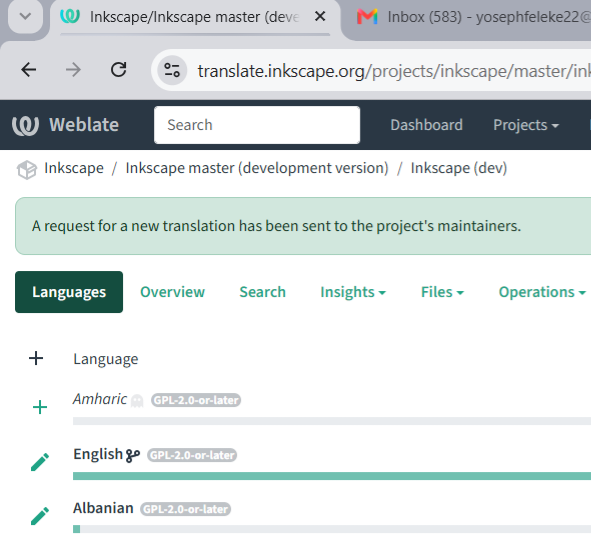
I just logged onto the Inkscape Weblate server to get started on the master branch, but it looks like the Amharic translation component is currently locked or uninitialized.
As seen in the translation dashboard, Amharic is grayed out with a plus sign rather than an edit pencil. I clicked the plus sign to start the language component, which triggered a notification stating that a request for a new translation has been sent to the project's maintainers.
Could you please approve that request on your end whenever you have a moment? Once it's initialized, I'll be able to jump right in and start translating the core menus. Thank you!
Yoseph
On Thu, Jun 25, 2026, 5:27 AM Maren Hachmann maren@goos-habermann.de wrote:
Am 25.06.26 um 03:27 schrieb ዮሴፍ ፈለቀ:
Thank you both for the insights and for explaining how the LINGUAS file works!
Duarte, I gave your suggestions a thorough try—including the environment variable method and attempting to swap out the .mo file in an existing language directory—but unfortunately, I still couldn't get the
translation
to register or display locally on my version of Inkscape.
Since the local testing workarounds didn't pan out, I want to pivot my focus entirely to working directly on the Weblate server as you both recommended. I will prioritize the high-traffic areas Maren mentioned,
like
the main menus, the Export dialog, and the Fill and Stroke panels.
Before I dive in, could you let me know if there are any specific documentation links, guides, or resources you recommend for learning how
to
navigate and use Weblate effectively?
I've never needed any documentation for doing translations in weblate, it was pretty self-explanatory, so I can't give any recommendations.
For administration, yes, but nothing beyond what is linked from the weblate page itself. The three-dots menu at the top has the link to the documentation.
Maren
Yoseph
On Wed, Jun 24, 2026, 7:49 PM Maren Hachmann maren@goos-habermann.de wrote:
Hi Yoseph,
for documentation, there is a threshold of '80% translated' per po file.
For the GUI translations, such a threshold does not exist, however we may manually disable languages that have a very low percentage / no translations, as has happened with Amharic in the past.
For a translation to be valuable to users, also the location of the translated strings in the interface is important. You can have lots of rarely seen strings translated, but the Fill and Stroke and Export dialog and menu items are not, for example. When starting out, I'd not focus on completion, but on the most important locations.
Let me know when you've uploaded your po file for the master branch for the first time! Maren
Am 23.06.26 um 23:11 schrieb ዮሴፍ ፈለቀ:
Thanks for the clarification!
Regarding updating the LINGUAS file once the translation is available
in
the repository from Weblate: does the Amharic translation need to be
100%
complete for you to add it to the file, or is there a minimum
completion
percentage required before it can be included so I can start testing it normally?
Best regards, Yoseph
On Fri, Jun 19, 2026, 7:32 PM Maren Hachmann maren@goos-habermann.de wrote:
Hi all,
yes, Duarte is right.
When a new translation language is added, I need to update the LINGUAS file. I'll do that once the translation is available in the
repository,
coming from Weblate.
When I do that, I'll also check whether any other languages might be missing.
Please get your po file from the Weblate server, because that one is updated from the Inkscape codebase automatically.
If Inkscape is not available in the PATH, other programs on your computer will not find it, and you will not be able to launch Inkscape from the command line.
Thanks! Maren
Am 19.06.26 um 11:26 schrieb Duarte Farrajota Ramos:
Yeah, you are right, I could not get it to work either. I mostly use
Weblate
these days, so I might be giving you outdated or incorrect
information.
Looking at the source tree, there seems to be a hardcoded list of
available
languages for Inkscape at
https://gitlab.com/inkscape/translations/-/blob/4c5583adc297cd4a2e2d68b0e3c3...
Which probably means you have to ask the developers to add that new
language
to the list, and will only be available in either future versions or
alpha
builds. Either way since this is likely to be a process that will take some
time, in
the meantime so you are not waiting around, you could try something
else.
Try translating your new po file normally with the correct language,
but
when
you create the .mo file place it in the folder of some other existing
language
you don't plan on using, and replace the inkscape.mo file there
(maybe
rename
the original for safe keeping), then from the UI pick that one
language
instead, and it should show you your translation in progress instead
of
the
actual language you picked. Once it gets sorted out and your language does exist, you can then
place
it in
the correct folder. On 19/06/2026 at 01:18, ዮሴፍ ፈለቀ yosephfeleke22@gmail.com wrote: Thanks for the detailed steps! I actually tried that exact setup before your email—compiling my
progress into
an inkscape.mo file and placing it under Inkscape\share\locale\am\LC_MESSAGES\inkscape.mo. However, when I
open
Inkscape, Amharic doesn't show up as an option in the language
dropdown
settings at all. To help me figure out what I might be doing wrong, could you clarify
a
couple
of things?
- The Source Files: I want to make sure I didn't download the wrong
files
from the server. Could you point me to the exact URL or directory
where I
should pull the correct .po files for the master branch? 2) System PATH: When installing Inkscape, there is an option that
says
"By
default Inkscape does not add its directory to the system PATH." Does
leaving
this unchecked impact how Inkscape detects custom local translation
folders?
If these two things are not the source of the issue, do you have any
idea what
else might be causing it not to appear? Yoseph On Fri, Jun 19, 2026, 1:20 AM Duarte Ramos duarte.framos@gmail.com
wrote:
You can edit it by hand with any (programmer) plain text editor, like
Notepad
or Kate, but that is error prone and easy to mess up. For a more user friendly GUI approach, you can use any pot file
editor
like
PoEdit or Lokalize, or any other that you find that you may like. I only used to use PoEdit, but they all probably have an option to
compile and
export an .mo file. You can then navigate to your Inkcape installation folder, under Inkscape\share\locale\ You will find a list of languages. If your translation target isn't
there,
create one with the corresponding language ISO code. In it place a
folder
called LC_MESSAGES, such that it ends up being something like Inkscape\share\locale##\LC_MESSAGES\ where ## is your language ISO
code.
In it place your .mo file named inkscape.mo you should then be able
to
run
Inkcape normally, and see your language as an option in the UI
language.
You should end up with something like Inkscape\share\locale\am\LC_MESSAGES\inkscape.mo On 18/06/2026 at 22:28, ዮሴፍ ፈለቀ yosephfeleke22@gmail.com wrote: I have a quick question regarding the workflow. I prefer not to do the translations directly inside the Weblate web
interface,
so I went to the server and downloaded a ZIP file containing the .po
files to
work on them locally. However, looking at the files has left me a bit confused. Could you please guide me on: What the best practice is for working on these .po files locally? How I can properly test the translations to see how they look inside
Inkscape
on my machine? Yoseph On Wed, Jun 17, 2026, 12:50 PM ዮሴፍ ፈለቀ yosephfeleke22@gmail.com
wrote:
Hi Maren and Duarte, Thanks so much for the warm welcome and for pointing me in the right direction! I will look through the documentation links you shared and log into
the
translation server to check out the master branch. I'll let you know
if
I run
into any questions as I get started. Yoseph On Tue, Jun 16, 2026, 1:50 AM Duarte Ramos duarte.framos@gmail.com
wrote:
Hi Yoseph. UI translation these days is mostly done through https://translate.inkscape.org/ Otherwise have you gone through https://wiki.inkscape.org/wiki/Translation_information ? Let us know if you have any further difficulties. On 15/06/2026 at 00:06, ዮሴፍ ፈለቀ yosephfeleke22@gmail.com wrote: I want to work on translating Inkscape into Amharic. Can you please
tell
me
what I need to do? Yoseph
Inkscape Translators mailing list --
inkscape-translator@lists.inkscape.org
To unsubscribe send an email to
inkscape-translator-leave@lists.inkscape.org
Hi Yoseph,
Amharic seems to be available for the master branch at the moment.
If someone else added it (Marc?), please, someone-else, don't just fix things but tell us about it, so we don't have to check and wonder what happened.
Maren
Am 25.06.26 um 05:30 schrieb ዮሴፍ ፈለቀ:
I just logged onto the Inkscape Weblate server to get started on the master branch, but it looks like the Amharic translation component is currently locked or uninitialized.
As seen in the translation dashboard, Amharic is grayed out with a plus sign rather than an edit pencil. I clicked the plus sign to start the language component, which triggered a notification stating that a request for a new translation has been sent to the project's maintainers.
Could you please approve that request on your end whenever you have a moment? Once it's initialized, I'll be able to jump right in and start translating the core menus. Thank you!
Yoseph
On Thu, Jun 25, 2026, 5:27 AM Maren Hachmann maren@goos-habermann.de wrote:
Am 25.06.26 um 03:27 schrieb ዮሴፍ ፈለቀ:
Thank you both for the insights and for explaining how the LINGUAS file works!
Duarte, I gave your suggestions a thorough try—including the environment variable method and attempting to swap out the .mo file in an existing language directory—but unfortunately, I still couldn't get the
translation
to register or display locally on my version of Inkscape.
Since the local testing workarounds didn't pan out, I want to pivot my focus entirely to working directly on the Weblate server as you both recommended. I will prioritize the high-traffic areas Maren mentioned,
like
the main menus, the Export dialog, and the Fill and Stroke panels.
Before I dive in, could you let me know if there are any specific documentation links, guides, or resources you recommend for learning how
to
navigate and use Weblate effectively?
I've never needed any documentation for doing translations in weblate, it was pretty self-explanatory, so I can't give any recommendations.
For administration, yes, but nothing beyond what is linked from the weblate page itself. The three-dots menu at the top has the link to the documentation.
Maren
Yoseph
On Wed, Jun 24, 2026, 7:49 PM Maren Hachmann maren@goos-habermann.de wrote:
Hi Yoseph,
for documentation, there is a threshold of '80% translated' per po file.
For the GUI translations, such a threshold does not exist, however we may manually disable languages that have a very low percentage / no translations, as has happened with Amharic in the past.
For a translation to be valuable to users, also the location of the translated strings in the interface is important. You can have lots of rarely seen strings translated, but the Fill and Stroke and Export dialog and menu items are not, for example. When starting out, I'd not focus on completion, but on the most important locations.
Let me know when you've uploaded your po file for the master branch for the first time! Maren
Am 23.06.26 um 23:11 schrieb ዮሴፍ ፈለቀ:
Thanks for the clarification!
Regarding updating the LINGUAS file once the translation is available
in
the repository from Weblate: does the Amharic translation need to be
100%
complete for you to add it to the file, or is there a minimum
completion
percentage required before it can be included so I can start testing it normally?
Best regards, Yoseph
On Fri, Jun 19, 2026, 7:32 PM Maren Hachmann maren@goos-habermann.de wrote:
Hi all,
yes, Duarte is right.
When a new translation language is added, I need to update the LINGUAS file. I'll do that once the translation is available in the
repository,
coming from Weblate.
When I do that, I'll also check whether any other languages might be missing.
Please get your po file from the Weblate server, because that one is updated from the Inkscape codebase automatically.
If Inkscape is not available in the PATH, other programs on your computer will not find it, and you will not be able to launch Inkscape from the command line.
Thanks! Maren
Am 19.06.26 um 11:26 schrieb Duarte Farrajota Ramos: > Yeah, you are right, I could not get it to work either. I mostly use Weblate > these days, so I might be giving you outdated or incorrect
information.
> Looking at the source tree, there seems to be a hardcoded list of available > languages for Inkscape at >
https://gitlab.com/inkscape/translations/-/blob/4c5583adc297cd4a2e2d68b0e3c3...
> Which probably means you have to ask the developers to add that new language > to the list, and will only be available in either future versions or alpha > builds. > Either way since this is likely to be a process that will take some time, in > the meantime so you are not waiting around, you could try something
else.
> Try translating your new po file normally with the correct language,
but
when > you create the .mo file place it in the folder of some other existing language > you don't plan on using, and replace the inkscape.mo file there
(maybe
rename > the original for safe keeping), then from the UI pick that one
language
> instead, and it should show you your translation in progress instead
of
the > actual language you picked. > Once it gets sorted out and your language does exist, you can then
place
it in > the correct folder. > On 19/06/2026 at 01:18, ዮሴፍ ፈለቀ yosephfeleke22@gmail.com wrote: > Thanks for the detailed steps! > I actually tried that exact setup before your email—compiling my progress into > an inkscape.mo file and placing it under > Inkscape\share\locale\am\LC_MESSAGES\inkscape.mo. However, when I
open
> Inkscape, Amharic doesn't show up as an option in the language
dropdown
> settings at all. > To help me figure out what I might be doing wrong, could you clarify
a
couple > of things? > 1) The Source Files: I want to make sure I didn't download the wrong files > from the server. Could you point me to the exact URL or directory
where I
> should pull the correct .po files for the master branch? > 2) System PATH: When installing Inkscape, there is an option that
says
"By > default Inkscape does not add its directory to the system PATH." Does leaving > this unchecked impact how Inkscape detects custom local translation folders? > If these two things are not the source of the issue, do you have any idea what > else might be causing it not to appear? > Yoseph > On Fri, Jun 19, 2026, 1:20 AM Duarte Ramos duarte.framos@gmail.com wrote: > You can edit it by hand with any (programmer) plain text editor, like Notepad > or Kate, but that is error prone and easy to mess up. > For a more user friendly GUI approach, you can use any pot file
editor
like > PoEdit or Lokalize, or any other that you find that you may like. > I only used to use PoEdit, but they all probably have an option to compile and > export an .mo file. > You can then navigate to your Inkcape installation folder, under > Inkscape\share\locale\ > You will find a list of languages. If your translation target isn't there, > create one with the corresponding language ISO code. In it place a
folder
> called LC_MESSAGES, such that it ends up being something like > Inkscape\share\locale##\LC_MESSAGES\ where ## is your language ISO
code.
> In it place your .mo file named inkscape.mo you should then be able
to
run > Inkcape normally, and see your language as an option in the UI
language.
> You should end up with something like > Inkscape\share\locale\am\LC_MESSAGES\inkscape.mo > On 18/06/2026 at 22:28, ዮሴፍ ፈለቀ yosephfeleke22@gmail.com wrote: > I have a quick question regarding the workflow. > I prefer not to do the translations directly inside the Weblate web interface, > so I went to the server and downloaded a ZIP file containing the .po files to > work on them locally. However, looking at the files has left me a bit > confused. > Could you please guide me on: > What the best practice is for working on these .po files locally? > How I can properly test the translations to see how they look inside Inkscape > on my machine? > Yoseph > On Wed, Jun 17, 2026, 12:50 PM ዮሴፍ ፈለቀ yosephfeleke22@gmail.com
wrote:
> Hi Maren and Duarte, > Thanks so much for the warm welcome and for pointing me in the right > direction! > I will look through the documentation links you shared and log into
the
> translation server to check out the master branch. I'll let you know
if
I run > into any questions as I get started. > Yoseph > On Tue, Jun 16, 2026, 1:50 AM Duarte Ramos duarte.framos@gmail.com wrote: > Hi Yoseph. > UI translation these days is mostly done through > https://translate.inkscape.org/ > Otherwise have you gone through > https://wiki.inkscape.org/wiki/Translation_information ? > Let us know if you have any further difficulties. > On 15/06/2026 at 00:06, ዮሴፍ ፈለቀ yosephfeleke22@gmail.com wrote: > I want to work on translating Inkscape into Amharic. Can you please
tell
me > what I need to do? > Yoseph > > > _______________________________________________ > Inkscape Translators mailing list -- inkscape-translator@lists.inkscape.org > To unsubscribe send an email to inkscape-translator-leave@lists.inkscape.org
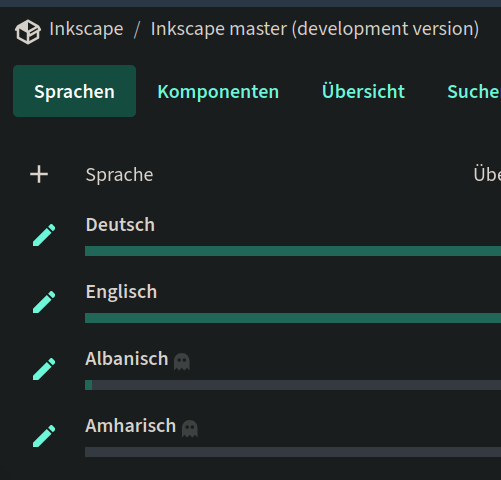
participants (4)
-
 Duarte Farrajota Ramos
 -
 Maren Hachmann
 -
 Noemi
Noemi -
 ዮሴፍ ፈለቀ