Spin slider widget, redux.

Hi all,
I've taken into account all the feedback and have developed a little test program that shows of a number of solutions to replacing the Gimp Spin Scale widget.
A gzipped tar file of the source code is attached so that you can try out the solutions (should be trivial to compile on Linux if you have the Gtk3 libraries). Not all of the solutions fully work as I didn't take the time to make them... but you should be able to get a feel for them. If you run in debug mode (see README) you can interactively add CSS. I've include an example CSS file you can paste into the debug window (ignore the colors, they were just for experimenting).
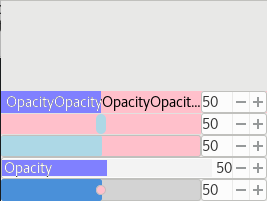
I've also attached PNGs of the widgets with and without the extra CSS.
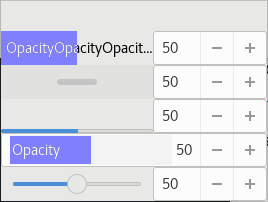
The five solutions, from top to bottom, are:
* Custom Gtk::Range widget couple with Gtk::Spinbutton:
This is my current favorite. It works quite well, methinks. Use the 'Alt' key to get into fine adjustment mode. It was rather simple to implement. Could be refined further (add styling properties, rounded corners, etc.).
* Gtk::Scrollbar coupled with Gtk::Spinbutton:
Works rather well, but doesn't show as well the current value. Using a narrow "slider" prevents it from covering up the text (text not implemented yet). I didn't know it before, but if one clicks on the slider and doesn't move for a second or two it enters into a fine- adjustment mode.
* Gkt::ProgressBar coupled with Gtk::Spinbutton:
CSS can get this looking pretty good but some extra work has to be done as the ProgressBar doesn't have an "adjustment", the class that actually handles tracking a value. The Gtk::Spinbutton actually contains a ProgressBar but while one can style it via CSS one can't directly access it and it overlaps the numerical entry part of the SpinButton (this is how the Gimp widget works).
* Subclassed Gtk::Spinbutton:
This is essentially a modified version of the Gimp widget but it has some major flaws as one cannot access the underlying widgets (ProgressBar, Buttons). In this example, the built in ProgressBar is disabled and new code that simulates a narrower ProgressBar has been added. I could not fine a good way to calculate how much narrower the new bar needs to be to not overlap the numerical entry part. Also, when dragging the bar it is easy to highlight the numerical text. The code to do all this is pretty messy.
* Gtk::Scale coupled with Gtk::Spinbutton:
CSS can make this look reasonable. Reducing the size of the circle will prevent it from covering text (text not implemented yet). Gtk::Scale also has a fine-adjustment mode accessed the same was as for a scrollbar.
Tav

I got it to build on my Ubuntu Mate 16.04 system. Here are my observations:
* Custom Gtk::Range widget couple with Gtk::Spinbutton:
This is my current favorite. It works quite well, methinks. Use the 'Alt' key to get into fine adjustment mode. It was rather simple to implement. Could be refined further (add styling properties, rounded corners, etc.).
With a white background and 1px dark grey border this looks pretty good. It does, at least, then look like a single composite widget, rather than a group of separate widgets. I am seeing major redraw problems with the bar, however.
I'm not convinced by Alt to get into fine adjustment mode. A lot of Linux window managers use Alt-drag to move windows around by default - this is already a problem in some areas of Inkscape use, but having to work around it for every slider in the application would be a pain. Perhaps use Ctrl or Shift instead?
(I also notice that pressing Alt when already dragging sets the value to 0, rather than switching to "fine control" from the current position. Not a concern for this test, but worth bearing in mind for the final thing)
- Gtk::Scrollbar coupled with Gtk::Spinbutton:
I'm not keen on this one, as the cognitive dissonance in it looking like a scroll bar but not actually scrolling anything is a bit too much for my meagre brain to handle. Perhaps if CSS can make it look a little less scrollbar-like it might be worth pursuing, but otherwise I think it will confuse more than it helps.
- Gkt::ProgressBar coupled with Gtk::Spinbutton:
As you mention, has the potential to look pretty good with some CSS, but with the non-functioning progress bar at the moment it's hard to tell how nice it will be in use.
- Subclassed Gtk::Spinbutton:
Up there with the first one in terms of looks, but doesn't suffer the same redraw problems. Issues with the size of the text widget though, as you noted.
- Gtk::Scale coupled with Gtk::Spinbutton:
Not too bad once I added a white background and a border to make it look more like a single composite widget. Not as obvious as the ones with a full-height bar, though. This is probably very subject to the whims of your GTK theme, however, as the thumb on mine is nothing like the circle in your screenshots (mine's a rectangle, for a start).
IMO the first one comes pretty close to what I would like to see, if the redraw issues can be addressed. Otherwise the fourth one is the best (though with issues around the value field), with the fifth one following in third place.
Regards,
Mark

At the end there is a tweak for the one I like.
We also need to add a class to the widget box when activate the widget to put in it by css a active state with box-shadow, like the one I remove for spin buttons.
############################CSS TO DEBUG MODE######################## /* You can type here any CSS rule recognised by GTK+. You can temporarily disable this custom CSS by clicking on the “Pause” button above.
Changes are applied instantly and globally, for the whole application. */
/*First hide less liked*/
#MySpinScale4{ opacity:0; } #MySpinScale3{ opacity:0; } #MySpinScale2{ opacity:0; } #MySpinScale1{ opacity:0; }
/*add padding for better look*/ box{ padding:10px; } box box{ padding:0px; }
/*tiny*/ spinbutton, entry, button { min-height: 2px; padding: 2px; margin: 0; }
/*my winner*/
#MySpinScale5 { background: #fff; border:#999; border-style:solid; border-width:1px; border-radius:3px; }
#MySpinScale5 spinbutton { background-color: #fff; border-color:#eee; border-width:0 0 0 1px; border-radius:0 3px 3px 0; box-shadow:none; } #MySpinScale5.activeNotWorkingJet { box-shadow: 0 0 0 1px #8080FF; } #############################################################
Cheers, Jabier.
On Wed, 2017-12-06 at 17:02 +0100, Tavmjong Bah wrote:
Hi all,
I've taken into account all the feedback and have developed a little test program that shows of a number of solutions to replacing the Gimp Spin Scale widget.
A gzipped tar file of the source code is attached so that you can try out the solutions (should be trivial to compile on Linux if you have the Gtk3 libraries). Not all of the solutions fully work as I didn't take the time to make them... but you should be able to get a feel for them. If you run in debug mode (see README) you can interactively add CSS. I've include an example CSS file you can paste into the debug window (ignore the colors, they were just for experimenting).
I've also attached PNGs of the widgets with and without the extra CSS.
The five solutions, from top to bottom, are:
- Custom Gtk::Range widget couple with Gtk::Spinbutton:
This is my current favorite. It works quite well, methinks. Use the 'Alt' key to get into fine adjustment mode. It was rather simple to implement. Could be refined further (add styling properties, rounded corners, etc.).
- Gtk::Scrollbar coupled with Gtk::Spinbutton:
Works rather well, but doesn't show as well the current value. Using a narrow "slider" prevents it from covering up the text (text not implemented yet). I didn't know it before, but if one clicks on the slider and doesn't move for a second or two it enters into a fine- adjustment mode.
- Gkt::ProgressBar coupled with Gtk::Spinbutton:
CSS can get this looking pretty good but some extra work has to be done as the ProgressBar doesn't have an "adjustment", the class that actually handles tracking a value. The Gtk::Spinbutton actually contains a ProgressBar but while one can style it via CSS one can't directly access it and it overlaps the numerical entry part of the SpinButton (this is how the Gimp widget works).
- Subclassed Gtk::Spinbutton:
This is essentially a modified version of the Gimp widget but it has some major flaws as one cannot access the underlying widgets (ProgressBar, Buttons). In this example, the built in ProgressBar is disabled and new code that simulates a narrower ProgressBar has been added. I could not fine a good way to calculate how much narrower the new bar needs to be to not overlap the numerical entry part. Also, when dragging the bar it is easy to highlight the numerical text. The code to do all this is pretty messy.
- Gtk::Scale coupled with Gtk::Spinbutton:
CSS can make this look reasonable. Reducing the size of the circle will prevent it from covering text (text not implemented yet). Gtk::Scale also has a fine-adjustment mode accessed the same was as for a scrollbar.
Tav
Check out the vibrant tech community on one of the world's most engaging tech sites, Slashdot.org! http://sdm.link/slashdot _______________________________________________ Inkscape-devel mailing list Inkscape-devel@lists.sourceforge.net https://lists.sourceforge.net/lists/listinfo/inkscape-devel
We also need to add a class to the widget box when activate the widget to put in it by css a active state with box-shadow, like the one I remove for spin buttons.
This is needed because "box" widgets don't support ":focus", ":hover"... so need a class added when active

Am 06.12.2017 um 17:02 schrieb Tavmjong Bah:
The five solutions, from top to bottom, are:
- Custom Gtk::Range widget couple with Gtk::Spinbutton:
- Gtk::Scrollbar coupled with Gtk::Spinbutton:
- Gkt::ProgressBar coupled with Gtk::Spinbutton:
- Subclassed Gtk::Spinbutton:
- Gtk::Scale coupled with Gtk::Spinbutton:
It's a bit hard to make a founded statement based on partially unfinished implementation (I assume many of those I'd consider unusable in the current form could be made to work reasonably well with CSS or minor code changes) so I'll try to comment mostly on the underlying functional aspects (although that's hard too without having a closer look at the actual implementation)... Anyway:
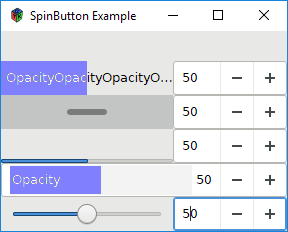
* While I appreciate (4) for the approach at achieving something compact it seems riddled with functional issues - besides the problem of the mouse being "catched" by the numerical input while working on the ProgressBar (and vice versa) the dynamic change of the ProgressBar's witdh causes the relative position to change abruptly as the total length changes (so this would need to be disabled). Also the design is problematic (borders all around the ProgressBar - not sure how straightforward this would be to fix) * (2) might be OK if tuned with CSS but it lacks the "filling" effect of the slider, so not ideal in my opinion. * (5) looks solid, too (at least the CSS-tweaked version considering we want to add text) - questions would be: does it have any advantages over the remaining choices? * (1),(3) look identical when tweaked with CSS but if you say (3) is more difficult to implement I don't see a reason to use it. * (1) seems to work (in principle) nicely considering functionality. Obviously the "slow scrolling" needs to be fixed to start at the current value and I'd also prefer a different modifier - likely Ctrl) but apart from that I don't see any obvious issues. However Design has some issues, for example I'd use use an arrow pointing up (but that's probably not important at this stage). What might be a more serious issue issue is the font rendering: For some reason the white font renders very badly. In your screenshots on Linux (where only grayscale anti-aliasing seems to be used) the text appears already really light and hard to read. On Windows (see attached), where subpixel anti-aliasing is used the text becomes even less legible (the anti-aliasing implementation might even be broken here). Maybe it can simply be tweaked away with CSS but maybe it's also a fundamental toolkit issue...
What I'm missing from all options: I really liked the suggestion to re-use the current design but fix the existing issues, most prominently make the number input insensitive while manipulating the slider and require a single click (without dragging) to enable number input. If I look at your designs all of them are made of less than 60% slider but over 40% of spinbutton. If I look into our toolboxes most of the sliders are only half as wide, though, which would result in about 20% slider (i.e. unusable) and 80% spinbutton (i.e. we could just drop the slider and use a spinbutton to start with). So *if* we want to continue using the proposed widgets in these places we still need to come up with a better design...
Best Regards; Eduard

On 06.12.2017 17:02, Tavmjong Bah wrote:
Custom Gtk::Range widget couple with Gtk::Spinbutton:
This is my current favorite. It works quite well, methinks. Use the
'Alt' key to get into fine adjustment mode. It was rather simple to implement. Could be refined further (add styling properties, rounded corners, etc.).
This one needs a border around the slider area.
As Mark noted, Alt is often used for window manager gestures, so use of Ctrl and Shift (in that order, I'd say), is preferable.
Subclassed Gtk::Spinbutton:
This is essentially a modified version of the Gimp widget but it has
some major flaws as one cannot access the underlying widgets (ProgressBar, Buttons). In this example, the built in ProgressBar is disabled and new code that simulates a narrower ProgressBar has been added. I could not fine a good way to calculate how much narrower the new bar needs to be to not overlap the numerical entry part. Also, when dragging the bar it is easy to highlight the numerical text. The code to do all this is pretty messy.
This one does a good job in appearing as a single widget, but won't fly if the width of the numerical input can't be dealt with properly.
I note that in all functional cases, the value jumps to the pointer on mouse-down. That should be an alternative, the main mode should be just "sliding" the value. That has been the norm; did I miss examples to the contrary in recent closed software applications?
As Eduard points out, the width requirement of the horizontal - and + buttons is problematic. What's wrong with a vertical arrangement? If you feel adventurous, try the attached Python/GTK script to see another way of offering stepping buttons.

Hi Tav,
Hopefully others can chime in with more feedback, but just wanted to say thanks for tackling it! Looking forward to seeing it in trunk.
Bryce
On Wed, Dec 06, 2017 at 05:02:32PM +0100, Tavmjong Bah wrote:
Hi all,
I've taken into account all the feedback and have developed a little test program that shows of a number of solutions to replacing the Gimp Spin Scale widget.
A gzipped tar file of the source code is attached so that you can try out the solutions (should be trivial to compile on Linux if you have the Gtk3 libraries). Not all of the solutions fully work as I didn't take the time to make them... but you should be able to get a feel for them. If you run in debug mode (see README) you can interactively add CSS. I've include an example CSS file you can paste into the debug window (ignore the colors, they were just for experimenting).
I've also attached PNGs of the widgets with and without the extra CSS.
The five solutions, from top to bottom, are:
Custom Gtk::Range widget couple with Gtk::Spinbutton:
This is my current favorite. It works quite well, methinks. Use the
'Alt' key to get into fine adjustment mode. It was rather simple to implement. Could be refined further (add styling properties, rounded corners, etc.).
Gtk::Scrollbar coupled with Gtk::Spinbutton:
Works rather well, but doesn't show as well the current value. Using
a narrow "slider" prevents it from covering up the text (text not implemented yet). I didn't know it before, but if one clicks on the slider and doesn't move for a second or two it enters into a fine- adjustment mode.
Gkt::ProgressBar coupled with Gtk::Spinbutton:
CSS can get this looking pretty good but some extra work has to be
done as the ProgressBar doesn't have an "adjustment", the class that actually handles tracking a value. The Gtk::Spinbutton actually contains a ProgressBar but while one can style it via CSS one can't directly access it and it overlaps the numerical entry part of the SpinButton (this is how the Gimp widget works).
Subclassed Gtk::Spinbutton:
This is essentially a modified version of the Gimp widget but it has
some major flaws as one cannot access the underlying widgets (ProgressBar, Buttons). In this example, the built in ProgressBar is disabled and new code that simulates a narrower ProgressBar has been added. I could not fine a good way to calculate how much narrower the new bar needs to be to not overlap the numerical entry part. Also, when dragging the bar it is easy to highlight the numerical text. The code to do all this is pretty messy.
Gtk::Scale coupled with Gtk::Spinbutton:
CSS can make this look reasonable. Reducing the size of the circle
will prevent it from covering text (text not implemented yet). Gtk::Scale also has a fine-adjustment mode accessed the same was as for a scrollbar.
Tav
Check out the vibrant tech community on one of the world's most engaging tech sites, Slashdot.org! http://sdm.link/slashdot
Inkscape-devel mailing list Inkscape-devel@lists.sourceforge.net https://lists.sourceforge.net/lists/listinfo/inkscape-devel
Hi all,
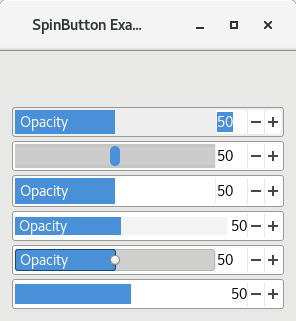
First, let me thank all of those who have given feedback! I've got an updated demo taking into account as much of the feedback as possible. A few of the changes:
* Shift replaces Alt to trigger slow-mo mode. * Slow-mo updating glitches fixed. * Order of drawing bar/text changed to give cleaner text. * Improved (and more realisitic styling). * Added a pure Gtk::SpinButton widget for reference (at bottom). * Fixed build instructions.
Some work that still needs to be done:
* Custom styling. I've tried two approaches and can't get either to work (and believe me, I've tried):
* Add custom color styling to a widget (I can add an integer property but nothing else).
* Access the styling of the child widgets in the SpinButton, especially the progress bar widget. I could then use those values for styling the custom progress bar.
* A few modifications are needed to handle right-to-left layout.
From my own experience and from feedback, I am inclined to replace the
Gimp Spin Scale widget with the top-most option. This has a reasonable performance and relatively simple code (20% of the number of lines compared to gimpspinscale.c). The second from bottom is also quite nice (slow-mo mode is triggered by holding the mouse down without moving for a second; it has 10% of the number of lines compared to gimpspinscale.c).
Tav
Hi Tavmjong.
Whats your opinion in change the container type from "Widget" to "Box" or other container you prefear.
https://stackoverflow.com/questions/41344241/gtkmm-c11-how-to-create-a-custo... http://ptomato.name/advanced-gtk-techniques/html/custom-container.html
Cheers, Jabier.
On Mon, 2017-12-11 at 13:35 +0100, Tavmjong Bah wrote:
Hi all,
First, let me thank all of those who have given feedback! I've got an updated demo taking into account as much of the feedback as possible. A few of the changes:
- Shift replaces Alt to trigger slow-mo mode.
- Slow-mo updating glitches fixed.
- Order of drawing bar/text changed to give cleaner text.
- Improved (and more realisitic styling).
- Added a pure Gtk::SpinButton widget for reference (at bottom).
- Fixed build instructions.
Some work that still needs to be done:
- Custom styling. I've tried two approaches and can't get either to
work (and believe me, I've tried):
* Add custom color styling to a widget (I can add an integer property but nothing else).
* Access the styling of the child widgets in the SpinButton, especially the progress bar widget. I could then use those values for styling the custom progress bar.
- A few modifications are needed to handle right-to-left layout.
From my own experience and from feedback, I am inclined to replace the Gimp Spin Scale widget with the top-most option. This has a reasonable performance and relatively simple code (20% of the number of lines compared to gimpspinscale.c). The second from bottom is also quite nice (slow-mo mode is triggered by holding the mouse down without moving for a second; it has 10% of the number of lines compared to gimpspinscale.c).
Tav
Check out the vibrant tech community on one of the world's most engaging tech sites, Slashdot.org! http://sdm.link/slashdot _______________________________________________ Inkscape-devel mailing list Inkscape-devel@lists.sourceforge.net https://lists.sourceforge.net/lists/listinfo/inkscape-devel
Am 11.12.2017 um 13:35 schrieb Tavmjong Bah:
Hi all,
First, let me thank all of those who have given feedback! I've got an updated demo taking into account as much of the feedback as possible. A few of the changes:
- Shift replaces Alt to trigger slow-mo mode.
Any reason for preferring Shift to Ctrl? Personally I'd consider Ctrl more intuitive (i.e. if I even tried a modifier key to control functionality of a widget, it would be Ctrl, not Shift) and I think others felt the same way. I assume you have a reason, I just have not heard it yet (but you seem to avoid Ctrl by all means ;-) ).
- Slow-mo updating glitches fixed.
Partially confirmed. There is still an issue if one clicks into the slider (-> value jumps to cursor position), then holds down Shift and starts moving the mouse (-> value jumps back to old position).
- Order of drawing bar/text changed to give cleaner text.
Confirmed, much more legible now.
- Improved (and more realisitic styling).
Confirmed (with spinbutton.css) except for 4th and last option where the large margin/padding on top and bottom of the slider still look a bit strange. One might think about making the background of the slider match the background of the numerical input (i.e. white) to achieve an overall more pleasing look; then again having a grayish background for the slider helps differentiate the slider area from the numerical input, so might not be a bad thing after all.
From my own experience and from feedback, I am inclined to replace the Gimp Spin Scale widget with the top-most option. This has a reasonable performance and relatively simple code (20% of the number of lines compared to gimpspinscale.c). The second from bottom is also quite nice (slow-mo mode is triggered by holding the mouse down without moving for a second; it has 10% of the number of lines compared to gimpspinscale.c).
I agree, the top one still seems to be the easiest to use. While UI of the of the second from bottom is OK, too (bullet hides the text, though) personally I don't get the slow-mo mode (same as with the second from top): When activating this mode there is still a small area "in the middle" that scrolls quickly when moving the mouse and moves around making it very unpredictable; when moving the mouse cursor far away it simply scrolls with continuous (very slow) speed.
What I'd still appreciate is some feedback on my earlier question: How do we intend to use this new spin slider widget? It obviously is not suitable as a direct replacement for the spin sliders we currently use in toolboxes due to the larger horizontal width requirement (the old widget was already too wide with gtk3/Adwaita). Do we drop the widget from these locations and use it only in the places were we have enough space available? Do we make the spin sliders wider (which would result in many controls becoming inaccessible if we do not require 21:9 screens)? Do we drop Adwaita and start "doing our own thing"?
Personally I don't see an easy option with the current designs. I actually tried to stack the +/- buttons again which could be realized with CSS (see the win32 theme for an example - you can select it from the "Visual" tab of the gtk inspector) but even then we still do not really gain enough space (and the gtk-devs were not wrong: the buttons become tiny). So maybe it's time to re-think spin slider widgets in toolboxes from the start and I'd say we should brainstorm this before finalizing on any design, otherwise we might just need to start over again once we realize the new widget did not gain us anything except a GPLv2+ licensing...
Best Regards, Eduard
On Tue, 2017-12-12 at 20:09 +0100, Eduard Braun wrote:
Am 11.12.2017 um 13:35 schrieb Tavmjong Bah:
Hi all,
First, let me thank all of those who have given feedback! I've got an updated demo taking into account as much of the feedback as possible. A few of the changes:
- Shift replaces Alt to trigger slow-mo mode.
Any reason for preferring Shift to Ctrl? Personally I'd consider Ctrl more intuitive (i.e. if I even tried a modifier key to control functionality of a widget, it would be Ctrl, not Shift) and I think others felt the same way. I assume you have a reason, I just have not heard it yet (but you seem to avoid Ctrl by all means ;-) ).
No particular reason... I'll switch it to Ctrl (by popular demand).
- Slow-mo updating glitches fixed.
Partially confirmed. There is still an issue if one clicks into the slider (-> value jumps to cursor position), then holds down Shift and starts moving the mouse (-> value jumps back to old position).
I'll look into this...
- Order of drawing bar/text changed to give cleaner text.
Confirmed, much more legible now.
- Improved (and more realisitic styling).
Confirmed (with spinbutton.css) except for 4th and last option where the large margin/padding on top and bottom of the slider still look a bit strange.
One might think about making the background of the slider match the background of the numerical input (i.e. white) to achieve an overall more pleasing look; then again having a grayish background for the slider helps differentiate the slider area from the numerical input, so might not be a bad thing after all.
From my own experience and from feedback, I am inclined to replace the Gimp Spin Scale widget with the top-most option. This has a reasonable performance and relatively simple code (20% of the number of lines compared to gimpspinscale.c). The second from bottom is also quite nice (slow-mo mode is triggered by holding the mouse down without moving for a second; it has 10% of the number of lines compared to gimpspinscale.c).
I agree, the top one still seems to be the easiest to use. While UI of the of the second from bottom is OK, too (bullet hides the text, though) personally I don't get the slow-mo mode (same as with the second from top): When activating this mode there is still a small area "in the middle" that scrolls quickly when moving the mouse and moves around making it very unpredictable; when moving the mouse cursor far away it simply scrolls with continuous (very slow) speed.
What I'd still appreciate is some feedback on my earlier question: How do we intend to use this new spin slider widget? It obviously is not suitable as a direct replacement for the spin sliders we currently use in toolboxes due to the larger horizontal width requirement (the old widget was already too wide with gtk3/Adwaita). Do we drop the widget from these locations and use it only in the places were we have enough space available? Do we make the spin sliders wider (which would result in many controls becoming inaccessible if we do not require 21:9 screens)? Do we drop Adwaita and start "doing our own thing"?
The advantage of CSS is we don't need to drop Adwaita to do our own thing... we can override part of the Adwaita theme. I plan on making the +/- buttons narrow by default.
I've done a search through the GUI and have found that the GimpSpinButton occurs in the following places:
* Objects dialog:
Included via the SimpleFilterModifier widget.
Note: Opacity is handled by a hand-rolled Scale and SpinButton combo.
The SimpleFilterModifier widget should be replaced by the CompositeSetting widget which includes the SimpleFilterModifier widget and a SpinScale widget for opacity.
* Layers dialog:
Included via the CompositeSettings widget.
Note: There are two instances of the CompositeSettings widget here which is strange as the CompositeSettings widget can handle both.
* Fill-Stroke dialog:
Included via the CompositeSettings widget.
* Filter Effects:
Included in various primitive sections via the SpinScale and DualSpinScale widgets. The labels inside the GimpSpinScale widgets are left blank and instead are put in a separate label widget in front of the SpinScale and DualSpinScale widgets. This could be changed to save space.
BTW, There is a spin-slider widget that is still in our code base but hasn't been used since 0.48. It is what the filter effects used then.
I don't see any particular case where we are seriously space constrained but if necessary we can replace the SpinScale by a simple SpinButton.
Personally I don't see an easy option with the current designs. I actually tried to stack the +/- buttons again which could be realized with CSS (see the win32 theme for an example - you can select it from the "Visual" tab of the gtk inspector) but even then we still do not really gain enough space (and the gtk-devs were not wrong: the buttons become tiny). So maybe it's time to re-think spin slider widgets in toolboxes from the start and I'd say we should brainstorm this before finalizing on any design, otherwise we might just need to start over again once we realize the new widget did not gain us anything except a GPLv2+ licensing...
I would be happy to entertain a better solution but in the meantime I'll go ahead with replacing the GimpSpinScale widget now. While it may not be an optimal solution, it is better than what is there now.
Tav
Best Regards, Eduard
Am 13.12.2017 um 15:13 schrieb Tavmjong Bah:
The advantage of CSS is we don't need to drop Adwaita to do our own thing... we can override part of the Adwaita theme. I plan on making the +/- buttons narrow by default.
I thought about that as well, but I realized it's not as easy as it might look initially:
* Modifying part of the CSS quickly leads to inconsistencies in the UI. For example if we change the spinbutton in the new slider widget it will look dissimilar to normal spinbuttons, so we should probably change those, too, and with them probably other buttons/entries and sooner rather than later we end up with *a lot* of custom CSS that will be hard to maintain, especially with the second point in mind: * How can we ensure compatibility with system/custom themes? If we restyle our widgets we easily override CSS from other themes. For example the spinbutton CSS from the test program already broke the win32 theme I was experimenting with and I doubt other themes are more robust...
The only solution I could come up with (and it's not satisfying): Pick one theme (that's about as much as we can maintain) and force Inkscape to use it. Are there any alternatives I overlooked?
I've done a search through the GUI and have found that the GimpSpinButton occurs in the following places:
Objects dialog:
Included via the SimpleFilterModifier widget.
Note: Opacity is handled by a hand-rolled Scale and SpinButton
combo.
The SimpleFilterModifier widget should be replaced by the CompositeSetting widget which includes the SimpleFilterModifier widget and a SpinScale widget for opacity.
Layers dialog:
Included via the CompositeSettings widget.
Note: There are two instances of the CompositeSettings widget here
which is strange as the CompositeSettings widget can handle both.
Fill-Stroke dialog:
Included via the CompositeSettings widget.
Filter Effects:
Included in various primitive sections via the SpinScale and
DualSpinScale widgets. The labels inside the GimpSpinScale widgets are left blank and instead are put in a separate label widget in front of the SpinScale and DualSpinScale widgets. This could be changed to save space.
BTW, There is a spin-slider widget that is still in our code base but hasn't been used since 0.48. It is what the filter effects used then.
I don't see any particular case where we are seriously space constrained but if necessary we can replace the SpinScale by a simple SpinButton.
What about: * tweak toolbar * pen toolbar * calligraphy toolbar * spray toolbar * eraser toolbar * fill toolbar
All of those use the GimpSpinScale, too, and these were the places where I think we actually *are* seriously space constrained. With Adwaita the toolbars are crowded, if not working full screen, many toolbars do not fit and widgets are hidden behind the arrow button to the right which I find extremely inconvenient to use.
Personally I don't see an easy option with the current designs. I actually tried to stack the +/- buttons again which could be realized with CSS (see the win32 theme for an example - you can select it from the "Visual" tab of the gtk inspector) but even then we still do not really gain enough space (and the gtk-devs were not wrong: the buttons become tiny). So maybe it's time to re-think spin slider widgets in toolboxes from the start and I'd say we should brainstorm this before finalizing on any design, otherwise we might just need to start over again once we realize the new widget did not gain us anything except a GPLv2+ licensing...
I would be happy to entertain a better solution but in the meantime I'll go ahead with replacing the GimpSpinScale widget now. While it may not be an optimal solution, it is better than what is there now.
I fully agree that we should move forward eventually and resolving the licensing issue and designing a new widget is much appreciated. If you think we can tailor the widget to resolve the functional concerns in hindsight that's fine by me. With my "respect" for gtk I was just afraid your work might go to waste if we ended up redesigning some aspect of the widget again...
Regards Eduard

Inkscape's speed/increment modifier convention is currently:
Alt = slower increment Shift = faster increment No modifier = normal (default) increment
We should definitely keep this consistent wherever it's possible to do so.
My 2p. -C
On Tue, Dec 12, 2017 at 7:09 PM, Eduard Braun <eduard.braun2@...26...> wrote:
Am 11.12.2017 um 13:35 schrieb Tavmjong Bah:
Hi all,
First, let me thank all of those who have given feedback! I've got an updated demo taking into account as much of the feedback as possible. A few of the changes:
- Shift replaces Alt to trigger slow-mo mode.
Any reason for preferring Shift to Ctrl? Personally I'd consider Ctrl more intuitive (i.e. if I even tried a modifier key to control functionality of a widget, it would be Ctrl, not Shift) and I think others felt the same way. I assume you have a reason, I just have not heard it yet (but you seem to avoid Ctrl by all means ;-) ).
- Slow-mo updating glitches fixed.
Partially confirmed. There is still an issue if one clicks into the slider (-> value jumps to cursor position), then holds down Shift and starts moving the mouse (-> value jumps back to old position).
- Order of drawing bar/text changed to give cleaner text.
Confirmed, much more legible now.
- Improved (and more realisitic styling).
Confirmed (with spinbutton.css) except for 4th and last option where the large margin/padding on top and bottom of the slider still look a bit strange. One might think about making the background of the slider match the background of the numerical input (i.e. white) to achieve an overall more pleasing look; then again having a grayish background for the slider helps differentiate the slider area from the numerical input, so might not be a bad thing after all.
From my own experience and from feedback, I am inclined to replace the Gimp Spin Scale widget with the top-most option. This has a reasonable performance and relatively simple code (20% of the number of lines compared to gimpspinscale.c). The second from bottom is also quite nice (slow-mo mode is triggered by holding the mouse down without moving for a second; it has 10% of the number of lines compared to gimpspinscale.c).
I agree, the top one still seems to be the easiest to use. While UI of the of the second from bottom is OK, too (bullet hides the text, though) personally I don't get the slow-mo mode (same as with the second from top): When activating this mode there is still a small area "in the middle" that scrolls quickly when moving the mouse and moves around making it very unpredictable; when moving the mouse cursor far away it simply scrolls with continuous (very slow) speed.
What I'd still appreciate is some feedback on my earlier question: How do we intend to use this new spin slider widget? It obviously is not suitable as a direct replacement for the spin sliders we currently use in toolboxes due to the larger horizontal width requirement (the old widget was already too wide with gtk3/Adwaita). Do we drop the widget from these locations and use it only in the places were we have enough space available? Do we make the spin sliders wider (which would result in many controls becoming inaccessible if we do not require 21:9 screens)? Do we drop Adwaita and start "doing our own thing"?
Personally I don't see an easy option with the current designs. I actually tried to stack the +/- buttons again which could be realized with CSS (see the win32 theme for an example - you can select it from the "Visual" tab of the gtk inspector) but even then we still do not really gain enough space (and the gtk-devs were not wrong: the buttons become tiny). So maybe it's time to re-think spin slider widgets in toolboxes from the start and I'd say we should brainstorm this before finalizing on any design, otherwise we might just need to start over again once we realize the new widget did not gain us anything except a GPLv2+ licensing...
Best Regards, Eduard
Check out the vibrant tech community on one of the world's most engaging tech sites, Slashdot.org! http://sdm.link/slashdot _______________________________________________ Inkscape-user mailing list Inkscape-user@lists.sourceforge.net https://lists.sourceforge.net/lists/listinfo/inkscape-user
Am 15.12.2017 um 16:11 schrieb C R:
Inkscape's speed/increment modifier convention is currently:
Alt = slower increment Shift = faster increment No modifier = normal (default) increment
We should definitely keep this consistent wherever it's possible to do so.
My 2p. -C
And where can I find a control in Inkscape that follows this "convention"? If we have a convention I'm totally fine with sticking with it, I'm just not aware of any (and if there is none I personally prefer Ctrl over Shift over Alt). If there is a convention it first of all needs proper documentation, so a) devs are aware of it and have a chance implementing it and b) users will have a chance of being aware of it and use it.
The only related thing I could find: While moving objects around and doing similar tasks we sometimes allow:
* No modifier = default increment * Alt = move by 1 pixel instead of default increment according to keys and mouse reference However this does not only seem to be problematic now that we use mm as default units, it also does not seem to work as advertised: When pressing Alt the change is relative to the current zoom level instead, so it might well be larger as the default increment without modifier * Shift = increase amount by 10 (can be used in any combination)
Maybe you were referring to that? With the confusing behavior it's hardly a convention either, though...
If in the end we really have no convention it might be a good time to think about one!
Best Regards, Eduard
participants (7)
-
 Bryce Harrington
 -
 C R
C R -
 Eduard Braun
 -
 Jabier Arraiza
 -
 Mark Crutch
 -
 Tavmjong Bah
 -
 Thorsten Wilms